websights

Fill out the form to download

Required field
Required field
Not a valid email address
Required field
Required field
  • Set up your own cloud-native simulation in minutes.

  • Documentation

    Fan Boundary Condition

    A fan boundary condition allows the user to assign a fan curve to a boundary of the computational domain. It is especially useful when the user has the fan curve of their equipment, but they don’t know for sure how much flow rate it generates.

    Depending on the configuration of the fan boundary condition, it can act as an inlet or an outlet —the sections below will expand on the usage and setup of this boundary condition.

    Fan Boundary Condition

    The fan boundary condition is available for the following analysis types:

    Find below an overview of the necessary configuration entries. Depending on the analysis type, the list of parameters may be slightly different:
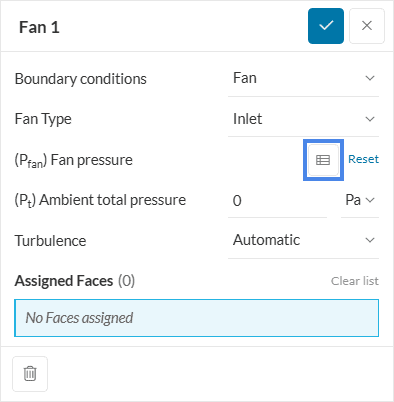
    accessing table input
    Figure 1: The icon highlighted in blue allows you to access the table definition.
    • The Fan Type dictates if the flow is going in or out of the domain. Valid options are Inlet (going in) and Outlet (going out).

    Inlet

    The settings for the inlet fan type are as shown below:
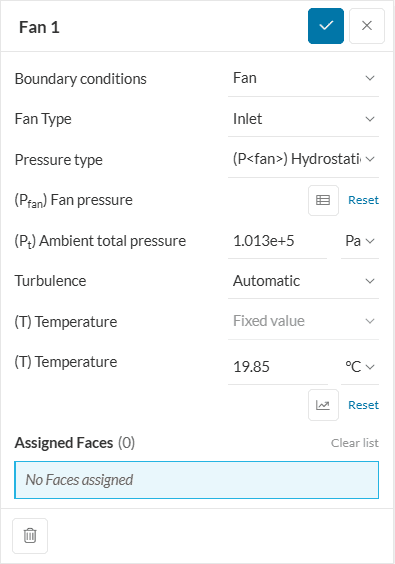
    Figure 2: Settings for the inlet fan boundary condition with compressibility toggle on
    • Pressure type: For compressible flows, an additional pressure type is available, Hydrostatic fan pressure, besides the default Fan pressure.
      • The Hydrostatic pressure formulation accounts for hydrostatic atmospheric effects in fans exposed to the atmosphere: the pressure decreases with increasing height to keep the domain at hydrostatic equilibrium. The ambient total pressure in the input sets the pressure at ground level.
    • (Pfan) Fan pressure: The fan pressure is based on total pressure values. Using the table icon, a fan pressure curve can also be input. Read more.
    • (Pt) Ambient total pressure: It defines the total pressure at the boundary. Please note that this will be a total gauge pressure for incompressible analysis types, and total absolute pressure for compressible simulations. If pressure type is hydrostatic, the ambient total pressure is set at ground level.
    • (T) Temperature: In the case of analysis types involving temperature, the algorithm also requests the temperature of the fluid when the fan is in Inlet mode.

    Outlet

    The settings for the outlet fan type are as shown below:
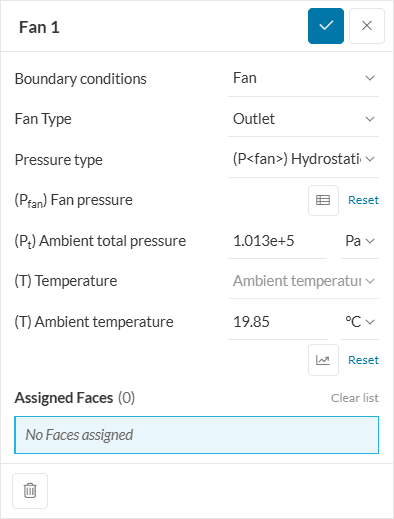
    Figure 3: Settings for the outlet fan boundary condition with compressibility toggle on
    • (T) Ambient temperature: It is the backflow temperature in case of outlet recirculation, i.e., the temperature at which the fluid would be reentering the domain

    The rest of the variables are already explained above.

    Fan Curve Definition

    Initially, to access the table definition, you can click on the table icon highlighted in Figure 1:

    In the window that opens, you can define your fan curve. Please note that the curve consists of volumetric flow rates and their respective fan total pressures:
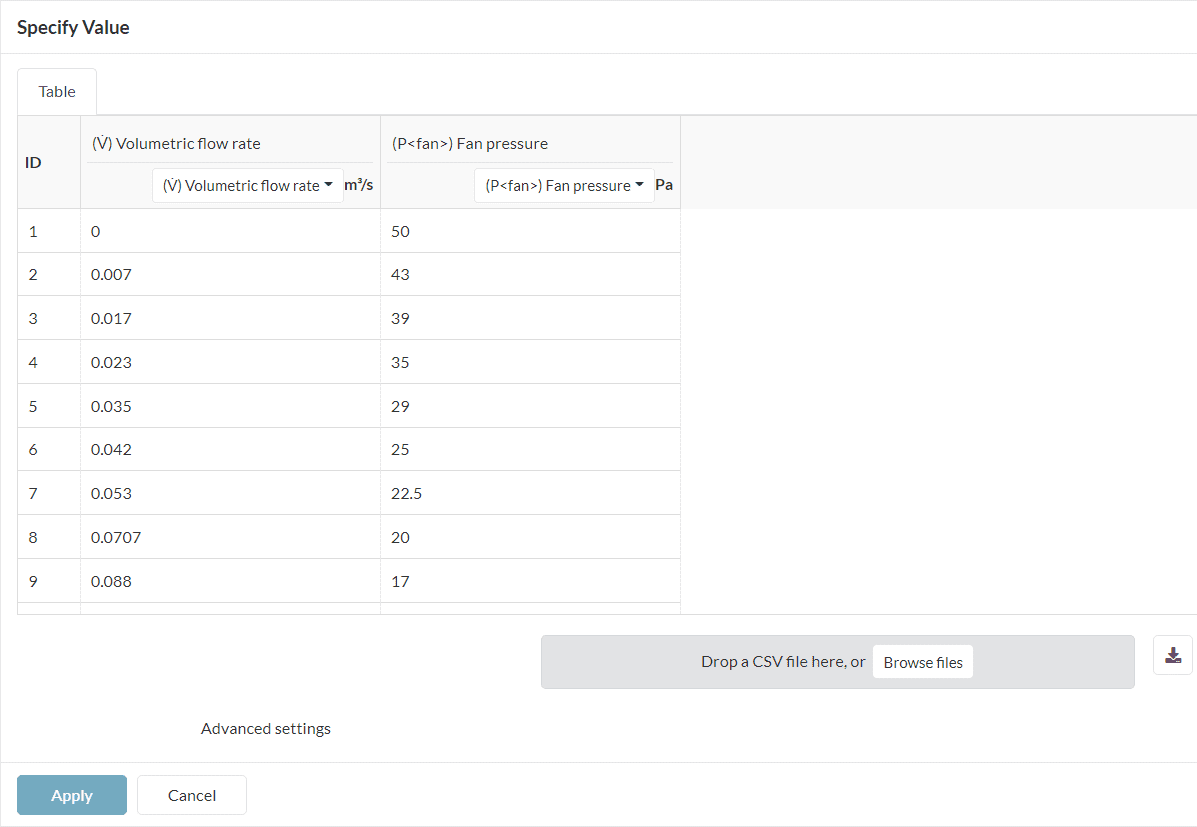
    fan curve pressure volumetric flow rate definition
    Figure 4: The fan curve is often provided by the fan manufacturer and can be used for the setup of CFD simulations.

    With this configuration, the CFD simulation will calculate the resulting volumetric flow rate based on the pressure drops experienced within the computational domain.

    If you are interested in seeing a sample project with a fan curve boundary condition, please refer to this article.

    Did you know?

    The fan boundary condition allows the definition of fan curves to boundaries of the computational domain. In case you are interested in defining fan curves internal to a flow region, this is possible with momentum sources.

    Last updated: August 11th, 2025

    Contents
