Natural Convection Inlet/Outlet
The Natural Convection Inlet/Outlet boundary condition is unique to SimScale and is used to represent a boundary surface that is open to an external environment allowing the fluid to pass through in and out.
For example, this boundary condition type can be used for open windows when modeling a room.
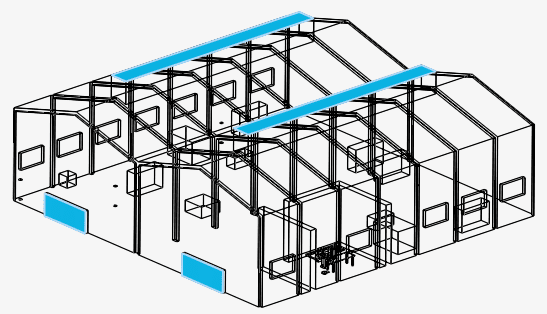
Figure 1 shows a real-life warehouse with natural convection happening at the exhausts (top) and the entry doors all highlighted in blue.
These surfaces will not be defined as pure inlets or outlets. They will behave (partially or totally) in one way or the other, depending on the local fluid conditions. As a result, recirculations and eddies are allowed at these patches, always complying with the continuity equation for the whole domain.
Defining in the Workbench
The natural convection inlet/outlet boundary condition is available for the following analysis types:
The UI for defining the settings for this boundary condition changes as per the analysis types and compressibility.
Convective Heat Transfer
Incompressible
For incompressible flow simulations, the settings panel for the Natural convection inlet/outlet boundary condition is as follows:
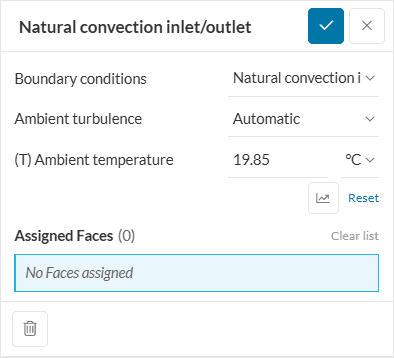
The user cannot define the value for the reference pressure explicitly, and it is taken from the initial conditions.
Compressible
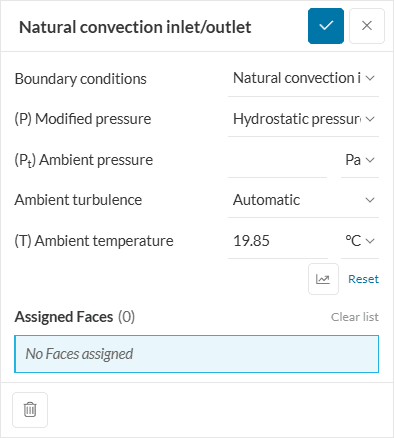
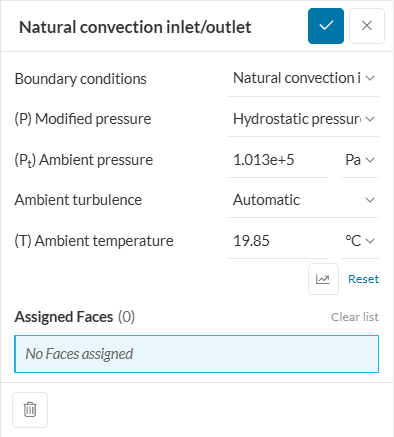
For compressible flow simulations, the user is required to define the ambient pressure. The ambient pressure is the total absolute pressure, either fixed or hydrostatic in nature. The nature of ambient pressure needs to be defined under modified pressure.
- The hydrostatic pressure formulation is suitable for atmospheric flows with perfect gas fluids. The pressure decreases with increasing height to keep the domain at hydrostatic equilibrium. The ambient pressure in the input sets the pressure at the ground level.
- The fixed pressure value formulation keeps the pressure constant as set in the ambient pressure input.
CHT & CHT (IBM)
Incompressible
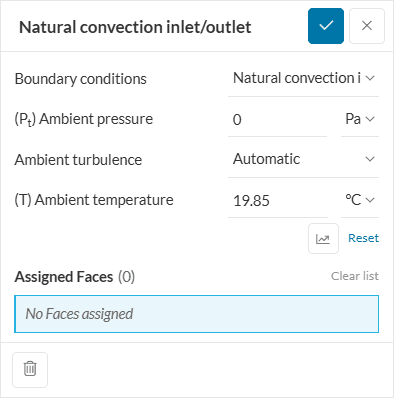
For conjugate heat transfer simulations with incompressible flows, the user needs to define the ambient total gauge pressure similar to Figure 4 below:
Compressible
For compressible flow simulations involving the conjugate heat transfer, the user has to define the ambient total absolute pressure and ambient temperature:
Parametric input
Note that the Ambient temperature can be defined parametrically for experiments. This article expands on the topic of parametric studies in SimScale.
Mathematics
Mathematically, when this condition is operated, the boundary conditions applied on each fluid variable are:
- Velocity: It is zero gradient at all times, combined with a zero value for the tangential velocity. While it is the standard condition for outflows, the normal velocity for inflows is calculated depending on local conditions.
- Ambient Pressure: At the surface, ambient pressure is defined as
- the total pressure when the local velocity vector is pointing inside the domain;
- the static pressure when the local velocity vector is pointing outside.
By doing this, we can specify the far-field static pressure of the environment, since Bernoulli’s Principle is satisfied for subsonic and incompressible cases. For example, when defining a window, you can specify the outer atmospheric pressure here.
- Temperature: The temperature takes an inlet-outlet behavior, which means that it becomes zero-gradient when the velocity vector aims outside the domain and switches to a fixed value when it aims inside the domain. This fixed value is the one that you will specify as Ambient temperature in the figures above.
- Turbulent variables: The turbulent variables like \(k\), \(\epsilon\), \(\omega\) have the same behavior as inlet-outlet. The fixed value is taken from the initial value at every cell.
Related Tutorials & Examples
Last updated: August 11th, 2025
Did this article solve your issue?
How can we do better?
We appreciate and value your feedback.