
SimScale’s Organization account empowers the administrators with more control over the members/ users of the account. It also removes the extra step of contacting SimScale engineers to approve certain permissions for the account users.
Detailed information on the structure and benefits of the organization account are mentioned below:
The following section answers the rights of the administrator of the organization account in an FAQ format.
Frequently Asked Questions
1. What permissions do I have as an admin of an organization account?
- Set the organizational CPU hour and GPU hour limits for the users
- Manage administrator rights, i.e. set other members as admins
- Allow or restrict users from creating public projects
- Invite users/colleagues to the account
- Remove users
2. Can the admins edit/view/share all projects from the users within the organization by default?
The admin does not have access to projects residing in the user’s personal space. However, admins can access projects in all team spaces if they want to.
3. Do I need to set the limit for every user in the organization account?
All users will have unrestricted access to the shared organizational pool of CPU and/or GPU hours by default. Limits can be set in place to stop some users from using more hours than desired. Consider a new user, it might be preferred to control how many GPU hours they can consume.
4. Can our users invite people from outside our organization?
Yes, and the administrators have the final authority to accept or reject any outside accounts before they can see any data from this organization. In such cases, Admins will receive a notification email.
5. What happens when a user is invited and an admin denies this request?
No invite is sent to the user.
6. If I set a 5000 CPUh budget to a user with an existing or partly used budget, what happens?
Their current budget will be replaced with 5000 CPUh and they will have 5000CPUh left to use.
7. What happens if I add more users than I have in my contract?
There is no built-in limit within SimScale. What exists in your contract is what should be adhered to.
8. When a user invites another user, how long does the invitation remain valid?
The invitation remains valid for 7 days after which it expires.
9. What are the permissions for Team Space admin, Organization admin, and SimScale admin?
| Action | Team Space Admin | Organization Admin | SimScale Admin |
|---|---|---|---|
| Create Team space |  |  | |
| Delete Team space | | | |
| Rename Team space | | | |
| Add/remove a user from Team space | | | |
| Promote Team Space admins | | | |
| Demote Team Space admins | | | |
| Change Team Space sharing settings | | | |
| View/Copy/Edit content in Team Space | | (not by default, only when added to the space) | |
10. Can I as an organization request to claim a domain?
Yes, organizations can claim their email domains. This means that new users of that domain who sign up for SimScale get added to the organization automatically. Read more.
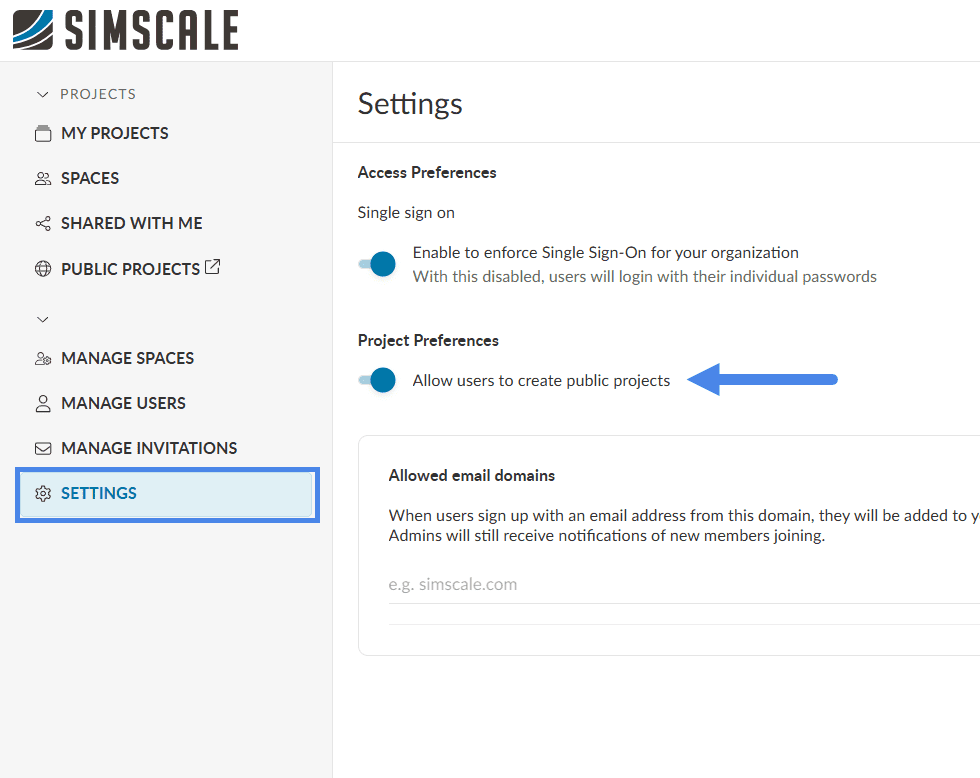
11. How to enable public project creation for users within an organization?
The admin needs to open the Dashboard and click on ‘Settings’ → Allow users to create public projects.
Be Careful!
Public projects are accessible to all users in the SimScale Community.
Important Information
If none of the above suggestions did solve your problem, then please post the issue on our forum or contact us.