
Every engineering workflow is a relay. A requirement becomes a CAD model, the model becomes a mesh, the mesh becomes a result, and the result becomes a design decision. The engineering inside each step is rarely what takes the time. The handoffs between steps are.
Dolphin, which has built heat transfer products for 40 years, handles about 500 requests for quote (RFQs) a month. Each one passes through seven stages. The thermal design stage alone can use seven or eight tools, and a single RFQ can produce 8 to 10 documents. Speaking at Agentic Unlocks, Dolphin’s team put it plainly: the problem isn’t engineering capability, it’s everything surrounding their engineers.
Multi-agent orchestration is how engineering teams are starting to close those gaps. Specialist AI agents handle CAD, simulation and design review, and an orchestration layer carries the context from one to the next, with engineers approving the decisions that matter.
The Engineering AI Blueprint
The reference architecture for autonomous engineering workflows: what changes when agents run for hours, the stack they need underneath, and where the autonomy red line sits.
What is AI agent orchestration?
AI agent orchestration is the coordination of several AI agents, each with its own job and tools, so they complete a multi-step task together. An orchestrator decides which agent works next, passes it the context it needs, checks what comes back and routes the result onward.
In engineering, those agents map onto disciplines and tools you already use. One agent reads requirements and documents. Another builds or edits CAD. Another sets up and runs simulation, and another checks the design against manufacturing guidelines. The orchestrator turns them from separate assistants into one workflow.
AI orchestration, the broader term, also covers models, data pipelines and conventional automation. Agent orchestration is the subset where the coordinated parts can reason and make decisions.
Why engineering workflows need multi-agent systems
A multi-agent system splits a job across agents that each own a narrow scope. For hardware development, that split mirrors how the work already happens. The engineering thread for one product runs through CAD, simulation, DFM checks, PLM and ERP, and no single vendor or model covers all of it.
A single general-purpose agent struggles here for practical reasons. Each tool has its own data model, failure modes and best practices. An agent that sets up a conjugate heat transfer case well needs different context from one that suppresses fillets before meshing, or one that checks rib thickness against an injection-molding guideline.
NVIDIA’s Todd McDevitt described the shift he sees across partners: from simple automations to agents that reason across multiple tools, launch and monitor solvers, recover from failures and interpret results. Once agents work at that level, the hard engineering problem moves to the handoffs: how several agents pass work between them without losing the thread.
Agents decide, tools calculate
Dolphin’s Design Head, Ahmed Ali, summed up the design rule behind its pilot:

Ahmed Ali
Design Head, Dolphin

“Agents are for making decisions, logical decisions, analytical decisions. Tools are for calculations and analysis.”
The split matters because large language models are probabilistic. An agent is good at choosing: which catalog core fits a duty point, which variant to run next, whether a mesh needs refining. A tool then does the deterministic work. The CAD kernel regenerates geometry, the solver computes the flow field and a trained Physics AI model returns a prediction. You get reasoning where it helps and repeatable numbers where you need them.
| Decision (agent) | Calculation (tool) |
|---|---|
| Which catalog core fits this duty point? | Thermal performance of that core |
| Which ribs should get thicker, and by how much? | Regenerated geometry with the new thickness |
| Is this mesh fine enough for the question? | Mesh generation and convergence metrics |
| Which variants go forward to a full solve? | Physics AI predictions across the whole design set |
| Does this result meet the requirement? | Stress, temperature or pressure drop from the solver |
An AI agent architecture for engineering: 3 layers
Dolphin’s pilot with SimScale runs in three AI layers, with agents carrying data between tools from the incoming RFQ to a validated design. It works as a reference model for any engineer-to-order or new product workflow.
| Layer | What it does | What it hands off |
|---|---|---|
| 1. Orchestration AI | Extracts requirements from the RFQ, pulls relevant examples from decades of past designs, and puts an engineer in the loop to review and modify parameters | Approved design parameters to the CAD layer |
| 2. CAD AI | Picks a core from Dolphin’s catalog and generates simulation-ready CAD | Parametric CAD and design parameters to the simulation layer |
| 3. Simulation AI | Runs product and core-pattern Physics AI models plus a product optimization tool | A validated design and alternative variants back to the engineer |
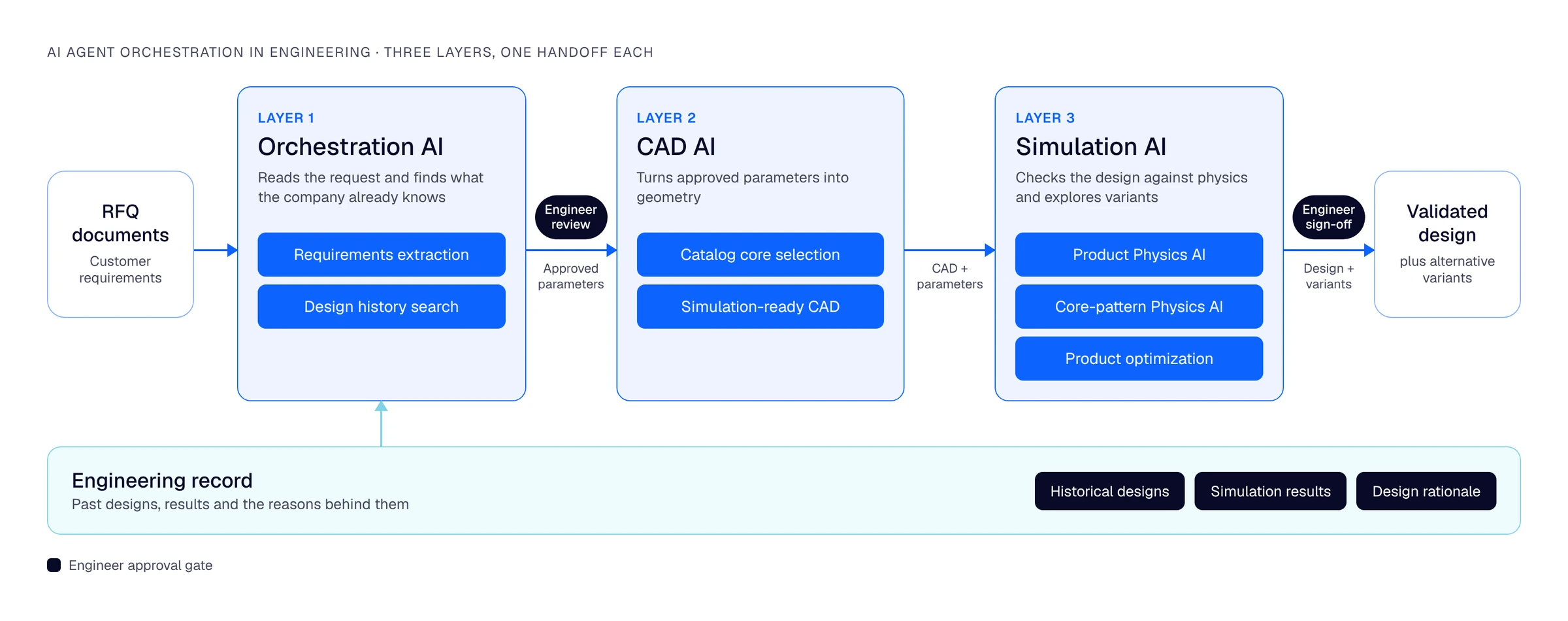
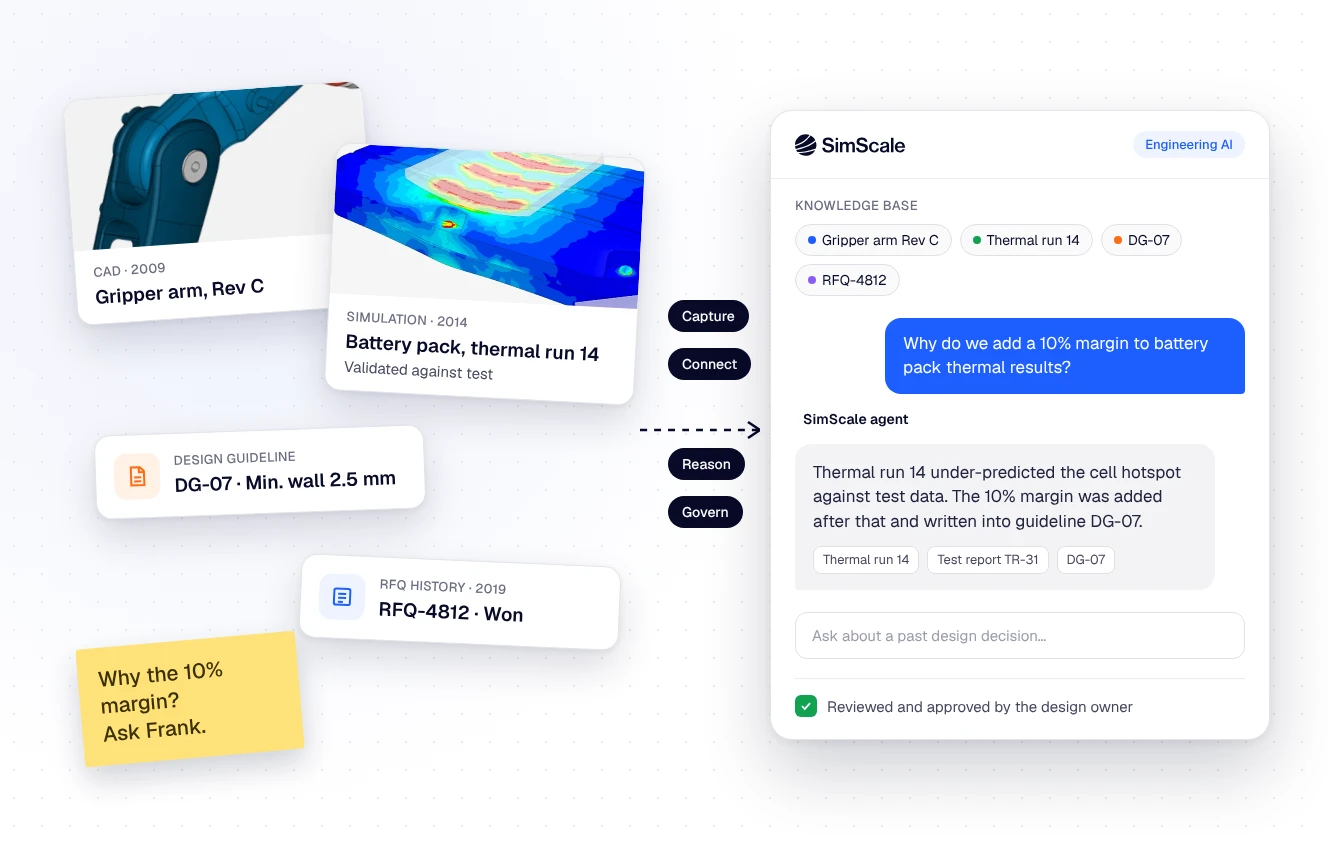
Two details make this architecture work. First, the intelligence comes from Dolphin’s own engineering record. In early testing, the agent gave credible design suggestions from historical records alone, before any Physics AI was added. Capturing that record is its own project; our guide to tribal knowledge in engineering covers how.
Second, Physics AI predicts in seconds, so the agent can check its proposal against physics before an engineer sees it. In milestone 1 testing, calculations ran about 30% faster than the traditional method. For selected RFQs, Dolphin is targeting 1 to 2 working days with 1 to 2 engineers, down from 3 to 15 days and 3 to 6 engineers today. Dolphin presented these as pilot projections. Watch Dolphin’s session, or see how SimScale approaches RFQ automation.
Multi-agent handoffs already running in engineering
Dolphin’s pipeline is one shape of orchestration. Two other handoffs shown at Agentic Unlocks connect tools from different companies.
Design review agent to simulation agent: CoLab and SimScale
CoLab’s AI reviews designs against a customer’s own design-for-manufacturing guidelines. In the demo, it recommended slightly thicker ribs on a camera housing to make it easier to manufacture, and a design engineer confirmed the finding.
The recommendation then went to the SimScale agent. The agent located the rib faces using the CAD data and a vision model, thickened them, copied the existing compression-case setup to the new geometry and re-ran the simulation. Von Mises stress and maximum displacement both came down, as expected.
In this demo the engineer passed the finding across by hand. CoLab and SimScale have also built a live integration in which CoLab’s agent requests the simulation directly and the SimScale agent returns results and clarifying questions into the review; read the takeaways from Design & Simulation Week. The demo also exposed the next handoff. Thicker ribs mean more material, and checking that cost belongs to yet another agent.
Parametric CAD to Physics AI to optimizer: Convion
Convion runs its loop through tools and a script, but the orchestration pattern is the same. Its engineers define the ejector geometry, variables and limits as parametric CAD in Onshape. A design of experiments then runs in parallel on SimScale to generate high-fidelity training data, and a Physics AI model trains on the results. Finally, a Python script uses the API to connect Onshape and the Physics AI model and runs the optimization.
The full optimization now takes 10 to 15 minutes instead of weeks of CFD runs. The AI-driven and full-CFD optima landed within 5% of each other, and the resulting component is 50% smaller than the original design.
Orchestration patterns for engineering agents
Most engineering workflows use one of four patterns, or a mix of them.
| Pattern | How work moves | Engineering example |
|---|---|---|
| Sequential pipeline | Each agent finishes and passes its output to the next | Dolphin: RFQ extraction, then CAD, then simulation |
| Request and return | One agent asks a specialist agent for an answer and waits for it | CoLab’s review agent requests a simulation from the SimScale agent |
| Surrogate loop | An optimizer calls a fast model many times, then the winner is checked with the full solver | Convion: Physics AI inside the optimization, CFD as the reference |
| Orchestrator with gates | A coordinator routes work and pauses for approval at defined steps | An engineer reviews parameters before CAD and signs off the final design |
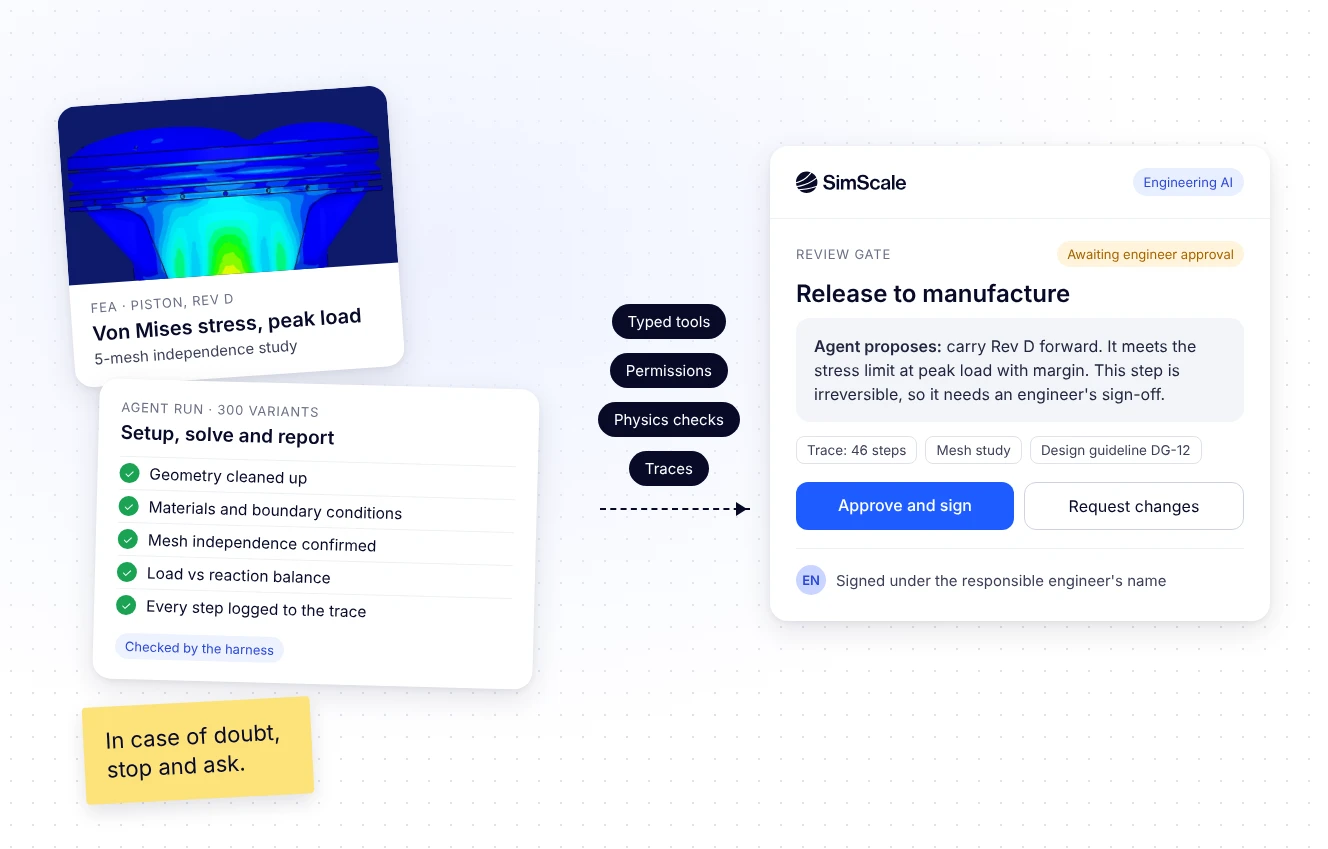
Routing also applies to the models behind each agent. Todd McDevitt’s advice was to save the large model for complex reasoning and send well-understood steps to cheaper ones. With licensing, compute and model costs all in play, that choice adds up quickly when an engineer who runs 3 simulations at once is replaced by agents spawning 300.
What makes an agent handoff trustworthy
A handoff is only as good as what travels with it. Four things separate a reliable multi-agent workflow from a demo:
- Context travels with the work. The requirement, the source record and the assumptions go with every handoff. Dolphin’s engineers won’t act on an answer they can’t check, so each output parameter has to link back to its process and source.
- The harness bounds each agent. McDevitt described partners building trust into the harness: typed tool calls, explicit permissions that limit what the agent can touch, and built-in checks such as load vs. reaction force balance and y+. “It’s important to judge the system on its traces,” he said.
- Physics checks every proposal. Physics AI lets an agent test an idea in seconds; a full solve confirms the shortlist before anyone signs.
- Engineers sit at the decisions that matter. In the CoLab workflow, nothing moves until an engineer confirms the finding. In SimScale’s thermal demo, the agent’s instruction was simple: in case of doubt, stop and ask.
What’s still missing: multidisciplinary trade-space reasoning
Today’s handoffs mostly run along one thread: review to simulation, or CAD to surrogate to optimizer. The harder problem is reasoning across disciplines at once. McDevitt said the industry hasn’t yet seen “multidisciplinary trade-space reasoning at scale,” where a team of agents works across the structures, thermal, controls, electronics, cost and manufacturing groups together. He thinks the building blocks are in place, and expects global systems integrators to play a big part in production deployments.
The tools will change to suit. Siemens’ Dirk Hartmann expects simulation software to be designed with agents as the primary user rather than humans. That means more connections between tools, and between the companies that build them.
Where SimScale fits in a multi-agent stack
SimScale’s orchestration layer is the access point for every interaction with the platform, from the browser, the API or an AI agent. An agent running a design exploration works through the same layer as an engineer reviewing results, with the same governance and traceability.
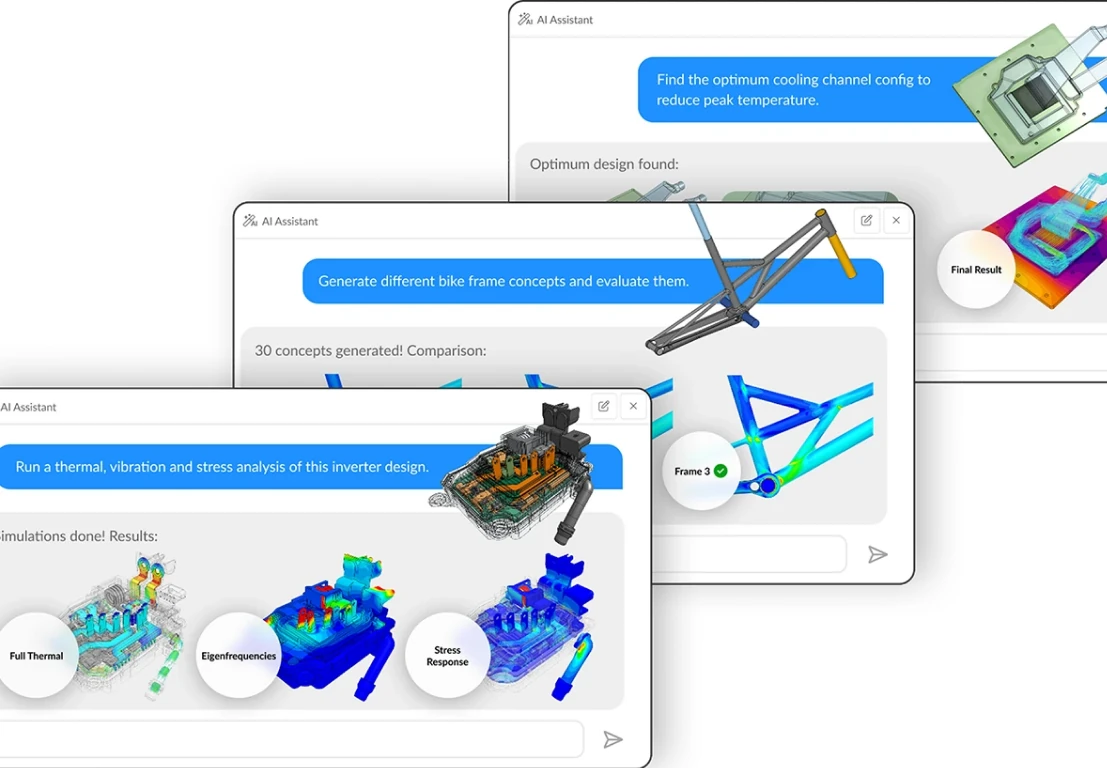
Engineering AI handles simulation setup, meshing, runs and reporting. Physics AI returns predictions in seconds once trained on your own simulation data. Open APIs connect the simulation layer to CAD such as Onshape, where the SimScale agent runs inside your CAD, to design review tools such as CoLab, and to your own scripts. See how teams use it for agentic workflow automation.
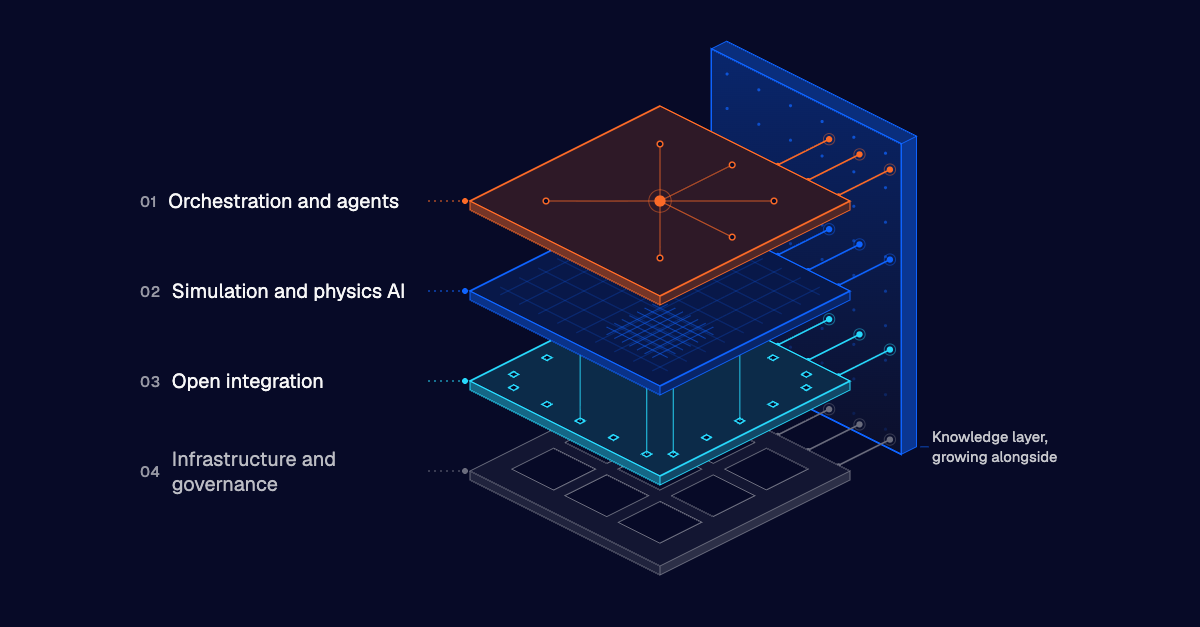
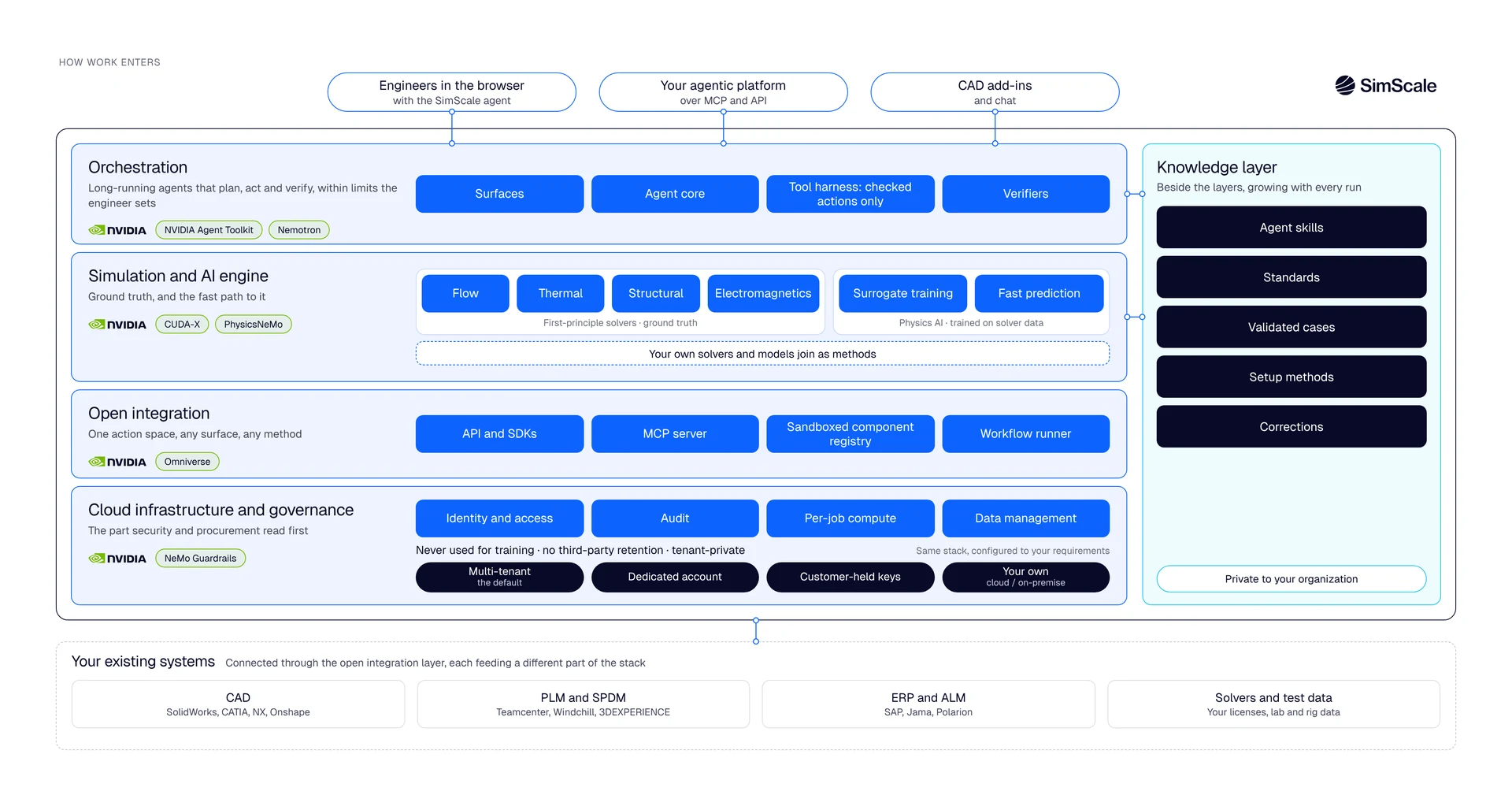
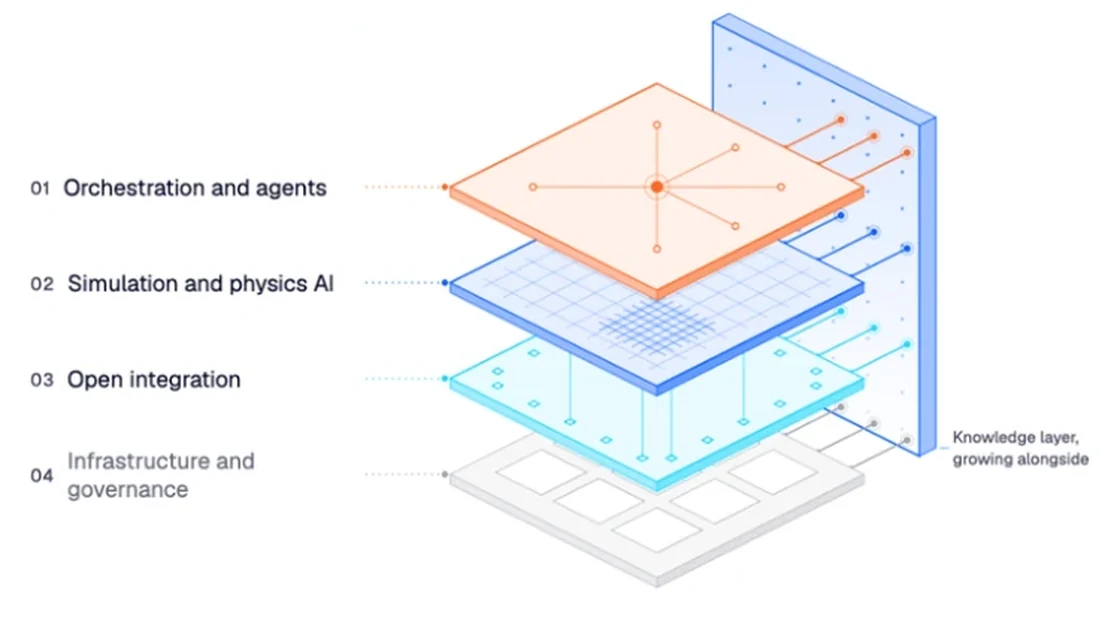
The Engineering AI Blueprint sets out the full stack: orchestration that hands CAD, simulation and post-processing to sub-agents, a simulation and AI engine, open integration, cloud infrastructure with governance, and a knowledge layer that belongs to your company. Our Blueprint webinar highlights walk through each layer with SimScale, NVIDIA and Capgemini.
Put orchestration, CAD and simulation agents to work
See how SimScale agents can hand off work across your own CAD, review and simulation tools.
Frequently Asked Questions
AI agent orchestration in engineering is the coordination of specialist AI agents, for example for requirements, CAD, simulation and design review, so they complete a multi-step workflow together. An orchestration layer routes work between them, passes context along and pauses for engineer approval at defined steps.
AI orchestration covers any coordinated use of AI models, data pipelines and automation. AI agent orchestration is the subset where the coordinated parts are agents that can reason, choose tools and make decisions.
A multi-agent system is a setup where several AI agents, each with a narrow scope and its own tools, work on parts of one task and pass results between them. In engineering, agents often map to disciplines or tools: CAD, simulation, manufacturability review or costing.
A common reference has three layers: an orchestration layer that reads requirements and design history and involves an engineer, a CAD layer that generates simulation-ready geometry, and a simulation layer that runs solvers or Physics AI models and returns validated designs. Agents make the decisions; deterministic tools do the calculations.
Agents take over the repetitive setup and data transfer between tools, while engineers define the problem, approve key decisions and sign off results. Dolphin describes the goal as releasing engineers for higher-value work, not removing them.
Conclusion
Multi-agent orchestration in engineering comes down to the handoffs. Give each agent a narrow job, let deterministic tools do the calculating, carry the context with every handoff and put engineers at the decisions that count. The teams at Agentic Unlocks are already running that pattern between review, CAD and simulation tools.
Watch the full sessions in Agentic Unlocks on demand, or read the event recap for the wider lessons.