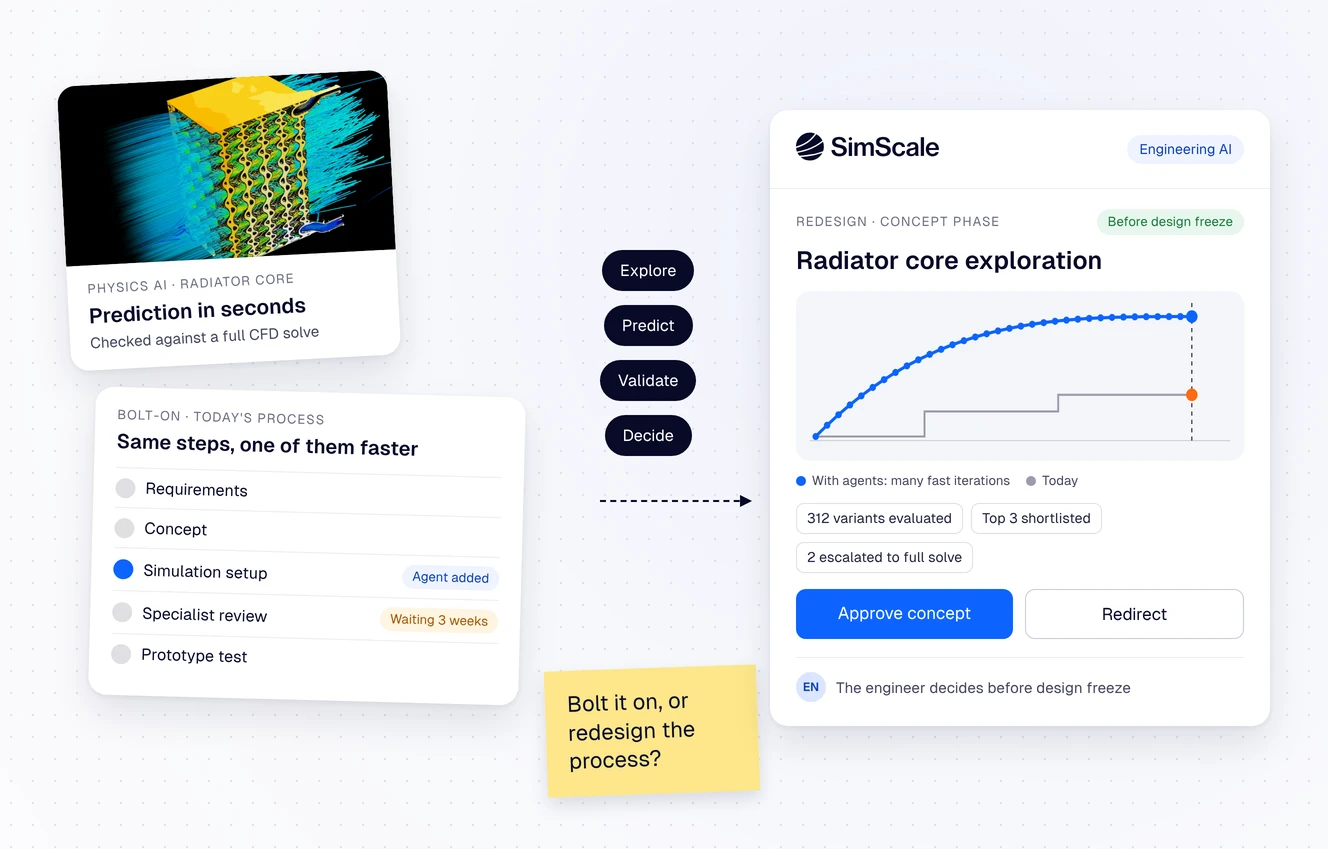

Most engineering teams start by adding AI to the process they already run: a copilot here, an automated setup script there. The product development process keeps its shape, and a few steps get faster.
The other option is harder: change the process itself, because AI changes what each step costs. SimScale CEO David Heiny put that choice to Siemens and NVIDIA on the expert panel at Agentic Unlocks. Will AI be bolted onto product development a step at a time, or will it reshape the process?
Across the panel, and in the Capgemini and Dolphin sessions the same day, the answer was both, in that order. Bolt-on is where most teams get their first wins. Redesign is where the economics of a program change. Here’s how to tell which one a workflow needs.
What is AI in product development?
AI in product development is the use of AI to generate, evaluate and refine product designs, and to automate the engineering work around them, from requirements and concept through simulation, validation and release. In hardware engineering, that means AI agents that set up and run simulations, physics models that predict performance in seconds, and automated checks that review designs against company rules.
Two related terms come up often. Agentic engineering is the way of working: AI agents carry out tasks such as setting up, running and interpreting studies, while engineers direct and review the work. Engineering AI is the technology that makes it possible: the agent, the solvers and physics models it calls, and the knowledge it keeps between runs.
Hardware is where the stakes are highest. A software team can test a change in seconds. A hardware team commits to a concept months before a prototype proves it right. As Heiny said when he opened the event: “The biggest impact of AI will not be in software, it’s going to be in hardware.”
Bolt-on vs redesign: two ways to bring AI into product development
The difference is what you change: individual tasks, or the process those tasks sit in.
| Bolt-on | Redesign | |
|---|---|---|
| What changes | Individual tasks inside the existing process | When decisions are made, who does what, and how tools connect |
| Typical first use | Simulation setup, meshing, reporting, drawing and document checks | Design exploration before concept freeze; end-to-end RFQ or design validation workflows |
| Where value shows up | Engineering hours saved on a known task | More designs evaluated, earlier evidence, less rework |
| What it needs | A tool, a pilot team and a task to automate | Connected tools and data, new review points, changed roles and KPIs |
| Main risk | Pilots that save time but never scale | Bigger upfront change, slower first proof of value |
The case for bolt-on: AI speeds up the work you already do
Dirk Hartmann, Technical Fellow at Siemens, pushed back on the idea of a sudden break. Multidisciplinary design optimization (MDO) has automated design exploration and run simulations offline, without a human in the loop, for about a decade. His own team had spent close to ten years on knowledge management for automation, which let them demo what we now call agents two months after ChatGPT came out. What surprised him is the speed.
Bolt-on also pays off today. Ian McGann, AI strategy lead for simulation engineering at Siemens, described a crash simulation workflow where the existing scripts worked about 80% of the time. An agent placed over the workflow now solves the other 20%, the cases that used to break the scripts, while the engineer still decides which deformation is acceptable. The process kept its shape, and the agent took over the step that kept failing.
SimScale customers show the same pattern. Each section of Dexory’s warehouse robot tower has 198 contacts and 192 bolted connectors. The SimScale agent now sets them up consistently across sections, so results can be compared with physical tests.
Bolt-on is the right call when a task is well defined, repeated often and quick for an engineer to check. Its limit is the ceiling. If every high-fidelity study still needs days and a specialist, faster setup moves the bottleneck without removing it.
The case for redesign: AI changes what each step costs
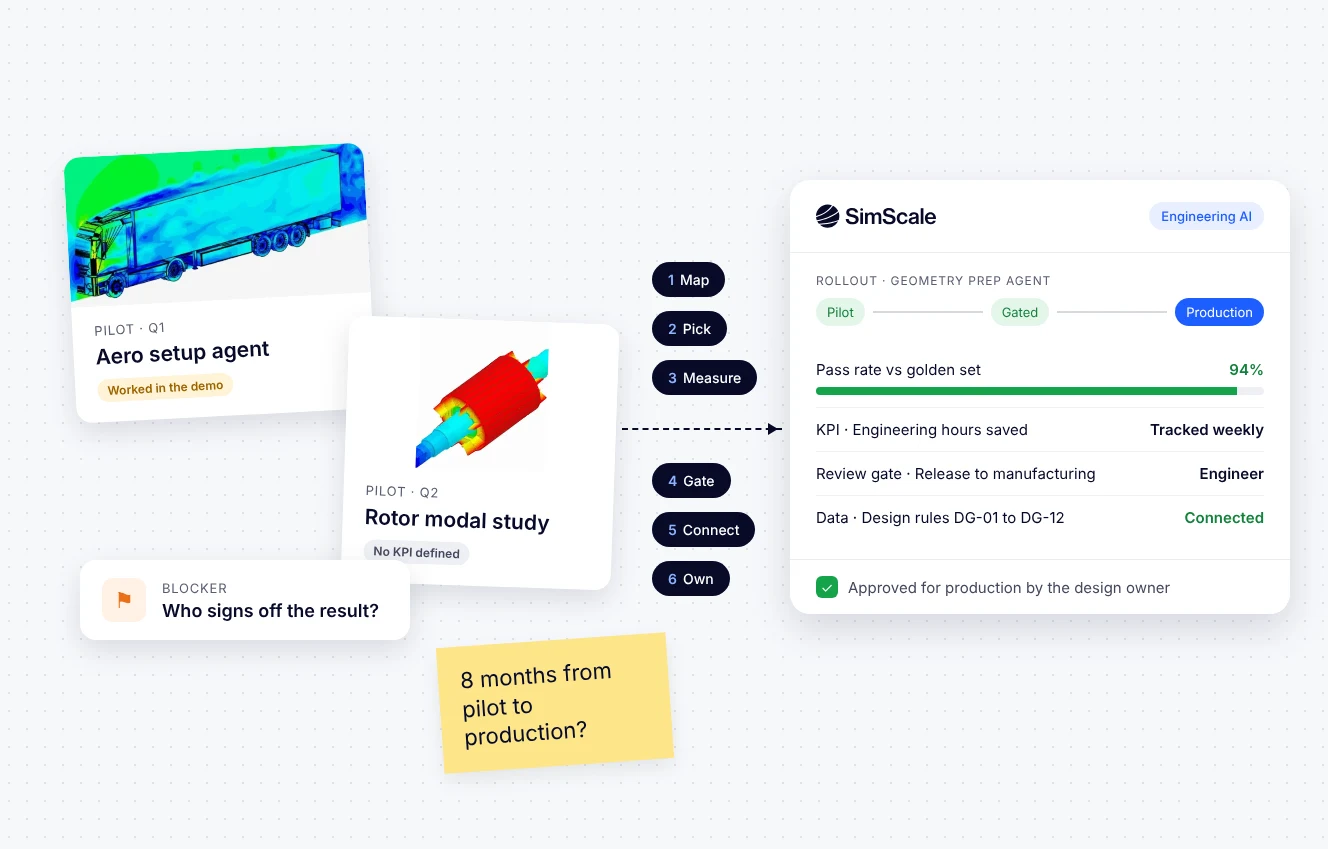
Capgemini Engineering sees the stalled pilots up close. Fewer than 10% of its clients think they have scaled AI. Marco Morone, from Capgemini’s mechanical engineering centre of excellence, traced much of that to how AI was introduced: pilots that showed real value but never entered the current development process. Capgemini’s first step with a client is a roadmap to redesign the workflow so it suits AI, with gates where an engineer verifies and certifies the results.
“It’s not just like AI is an add-on,” said Matthieu Lebas, Capgemini’s global AI lead. “It’s changing the way of working.” The two named more conditions:
- Digital continuity. Engineering software that exchanges data directly, for example over APIs, so work doesn’t stop at every handoff.
- An end-to-end life-cycle view. Think in whole flows instead of one use case at a time. A use case that saves an hour in one tool and then emails a file to the next step leaves the product’s cycle time where it was.
- KPIs for payback. Economic and technical KPIs built into the new workflow, so management can see where AI pays off and where it doesn’t.
With a German automotive OEM, Capgemini uses what is now its standard five-step approach for rolling AI out across an entire R&D department. It starts with a process and workflow assessment to find the bottlenecks, then builds the foundation step by step toward a platform that orchestrates workflows across engineering departments. In aerospace, its agentic drawing checker cut review time by 55%.
Our own research points the same way. The State of Engineering AI 2026 survey of 350 engineering leaders found that what separates teams getting measurable impact is how AI is embedded into workflows, infrastructure and decision-making. Teams using AI workflows evaluate more than 3× as many design variants per program.
Why the V-model is where redesign pays off
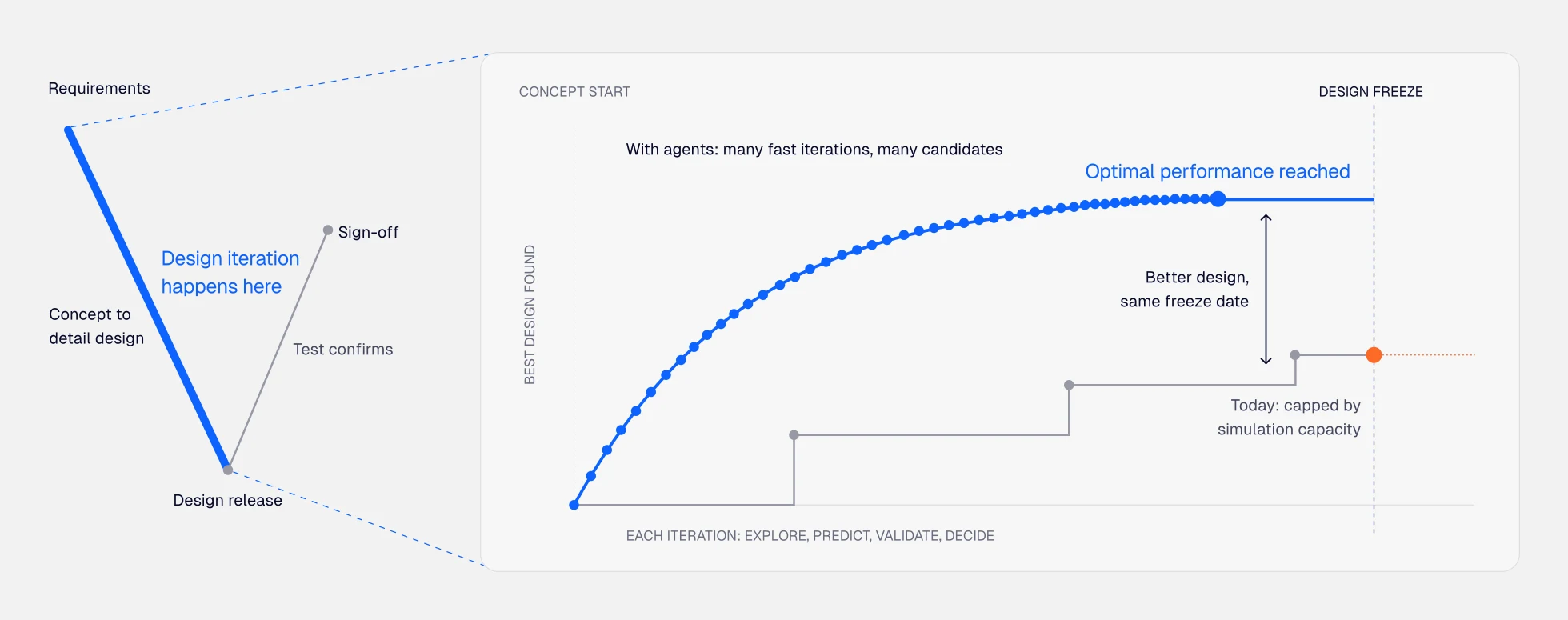
Most hardware programs follow some version of the V-model: commit to a concept early, prove it with integration and test late. The wait between commitment and proof is where cost builds up. A study of unmanned aerial vehicle development found that design decisions made before design freeze accounted for 86% of total expected program cost, and that early design defects caught late needed more than ten times the rework (Tan, Otto and Wood, Design Science, 2017).
A bolt-on makes each analysis in that V cheaper. A redesign uses cheaper analysis to change when decisions get made. In the Engineering AI Blueprint, each design iteration in the concept phase runs in four steps:
- Explore: the agent generates and varies design options.
- Predict: Physics AI returns performance in seconds.
- Validate: a physics-grounded check escalates to a full solve where it matters.
- Decide: the engineer approves, rejects or redirects.
Each iteration takes minutes, so the team evaluates far more candidates before concept freeze. In the Blueprint’s words, exploration replaces selection, and physical testing moves toward confirming what the team already knows.
Convion shows what that looks like in one workflow. The team ran hundreds of simulations in parallel on SimScale, trained a Physics AI model on the results, then ran its design loop against the model. The cycle went from months to under an hour for thousands of design variants. The model’s predictions came within 5% of high-fidelity CFD, and the final geometry takes up 50% less volume.
Redesign is an operating model change
Dolphin Global Holdings has built heat transfer products for four decades. “Together we are exploring a new operating model for engineering,” said Group Chief Strategy Officer Padmanabh Nimbhorkar. At Dolphin, an RFQ passes through 7 stages, from review and thermal design to costing and final deliverables, about 500 times a month. Depending on complexity, one RFQ takes 3 to 15 working days and 3 to 6 engineers. For selected RFQs, the target is 1 to 2 working days with 1 to 2 engineers orchestrating more of the process, using SimScale Engineering AI agents and Physics AI. Dolphin’s stated aim is to release engineers for higher-value work.
Dolphin began with the information it already held. “Do not start at the tool,” said Executive Director Mohammed N.J. “Start with a record that you already own.” Its roadmap runs capture, connect, reason and govern, and the order matters: AI placed on top of scattered information only creates chaos faster. Much of the work is about people and process: which decisions an agent may take alone, which need sign-off, and how roles and reviews change around it.
What changes for engineers when AI reshapes product development
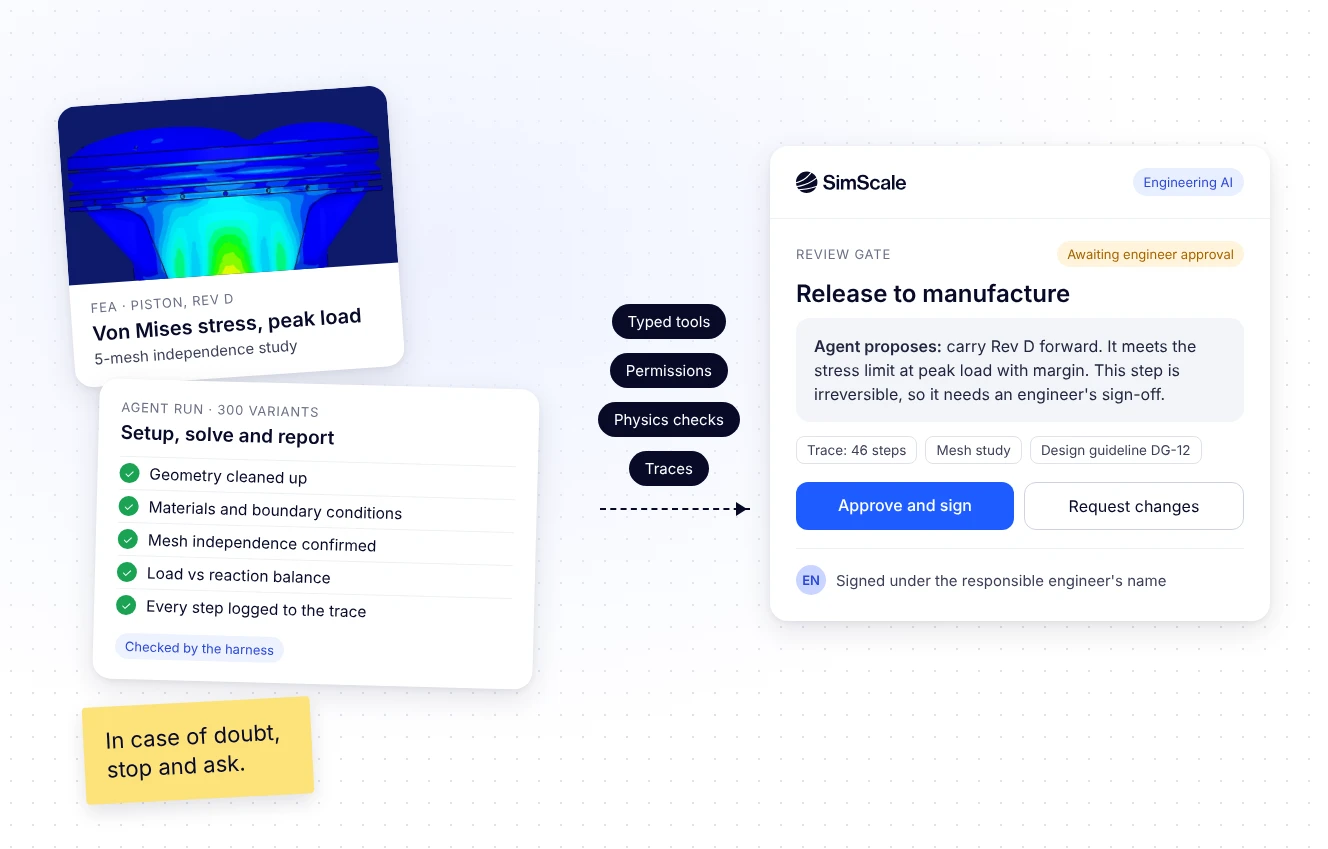
Hartmann expects the biggest change to land on the tools. Today’s simulation software is built for a human in the loop, who creates the mesh and chooses the parameters. Future tools will be designed with agents as their primary user. That changes the volume of work: as NVIDIA’s Todd McDevitt put it, an engineer might run three simulations at once, while agents will spawn 300.
McDevitt expects engineering value to move to “the bookends”. Upstream, engineers define the problem, the assumptions, the physics that matter and the constraints. Downstream, they verify, sign off and own the decision. Operating software in the middle is where engineers spend much of their time today, and it is the part agents take over.
McGann drew the comparison with software teams, where roles are splitting into prototypers who try new ideas fast and perfecters who take the best ones and make them ready to scale. He expects the same once everybody can simulate. “The job won’t change, but the role will change.”
That shift is also the clearest test of which path a team is on. If engineers spend the same hours on the same steps with AI help, it’s a bolt-on. If problem definition, review and decision ownership take a bigger share of the week, the process has changed.
How to choose: bolt-on, redesign or both
Every speaker treated this as a sequence. Use bolt-on wins to build evidence and trust, and plan the redesign from the start so pilots have somewhere to go. A practical sequence for an AI product development process:
- Pick one workflow, end to end. The panel’s advice to engineering leaders was to think big, start small, and pick one workflow now. Choose a whole workflow such as design validation or RFQ response, instead of a scattered list of tasks.
- Map where decisions wait. Find the steps where the team waits for evidence: simulation queues, specialist availability, handoffs between tools. Those set your cycle time.
- Bolt on where work is repeated and checkable. Setup, meshing, mesh studies, reporting and drawing checks are good first jobs, because an engineer can verify the output quickly.
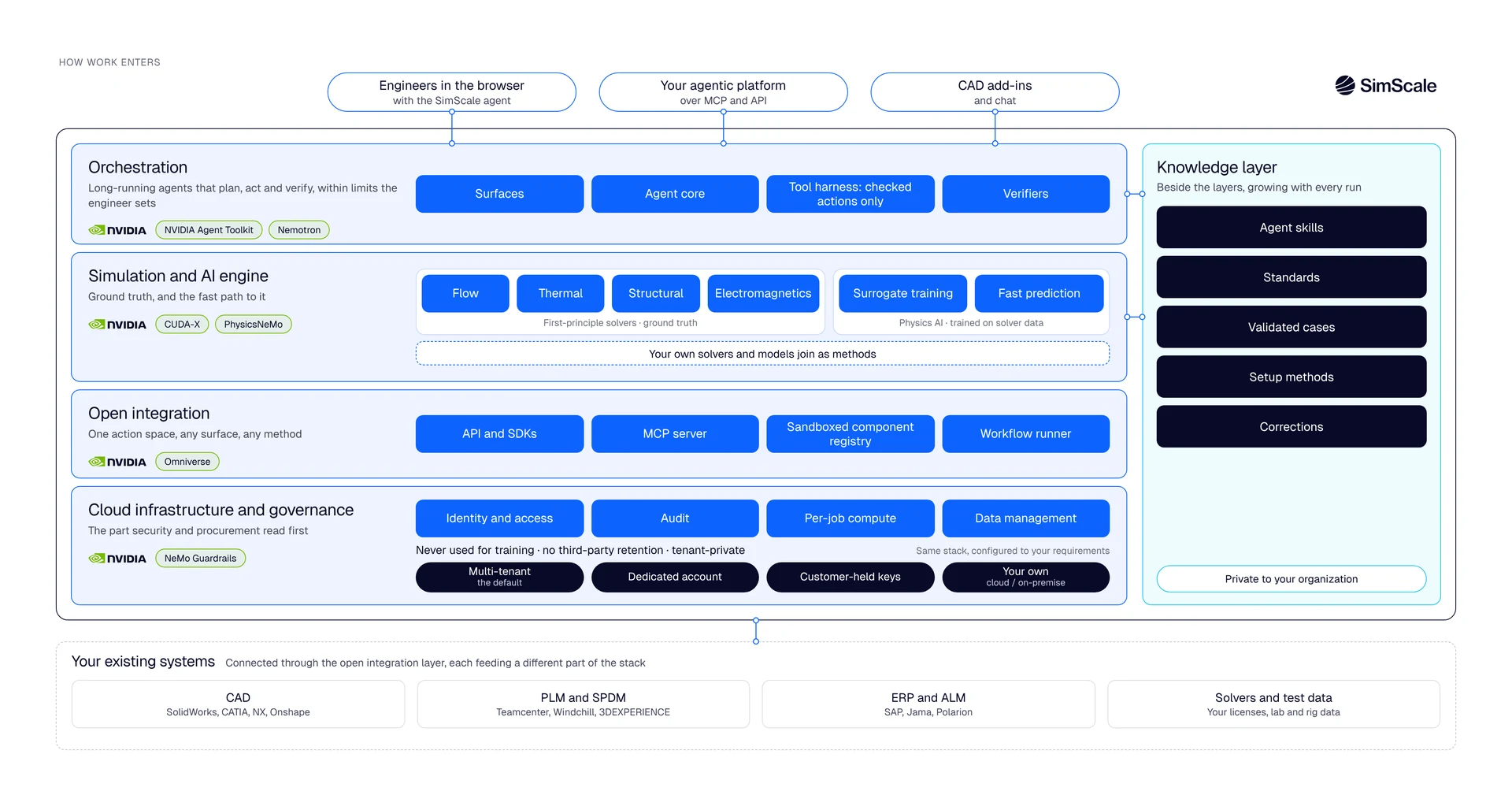
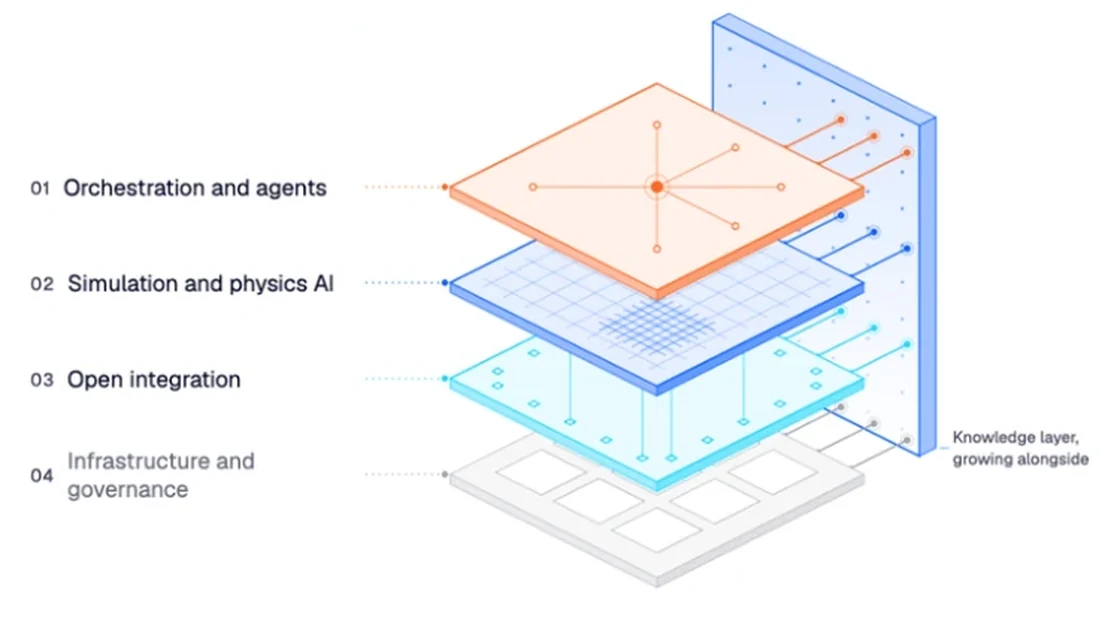
- Connect the tools. Gains compound only when CAD, simulation, PLM and the agent exchange data without manual handoffs. This is Capgemini’s digital continuity point.
- Move evidence earlier. Use parallel simulation and Physics AI to evaluate more candidates before concept freeze, and put engineer review gates at the decisions that are expensive to reverse.
- Measure the process. Track cycle time, designs evaluated per program and rework found after concept freeze, alongside engineering hours saved.
Some teams will go further. In the closing builders’ panel, Heiny described organizations asking what their process would look like if they started from scratch and cut out steps they no longer need, usually on simpler, non-critical systems first. To rank candidate use cases, he suggested impact times confidence, divided by effort. The builders added two filters: pick a workflow where you already know how a human will review the answer, and pick work your team does weekly or daily, so the agent’s output can be checked again and again.
Bolt-on saves hours on a step. Redesign changes how many designs a team can evaluate before it commits.
See Engineering AI in your product development process
Agents and Physics AI that run design exploration and validation on your own CAD.
Frequently Asked Questions
In hardware product development, AI agents set up, run and report simulations, Physics AI models predict performance in seconds, and automated checks review designs against company guidelines. Engineers use these to evaluate more design options earlier and to cut manual work in setup, analysis and documentation.
An AI product development process uses AI at each design iteration: an agent explores design options, a physics model predicts their performance, a physics-grounded check validates promising candidates, and an engineer decides. Because each loop takes minutes, teams run many more iterations before concept freeze.
Most teams do both. Adding AI to repeated, easy-to-check tasks gives quick wins and builds trust. Redesigning the workflow, with connected tools, earlier evidence and new review points, is what changes cycle time and rework across a program.
Engineers spend less time operating software and more time at the bookends: defining problems, assumptions and constraints, then verifying results, signing off and owning decisions. Agents can run hundreds of simulations, so review and judgment take a larger share of the work.
SimScale’s State of Engineering AI 2026 report puts the average at around eight months from pilot start to the first production deployment. Mature teams reach production in 3 to 6 months, while others take a year or more.
Conclusion
Bolting AI onto product development is the right first move for most teams: it gives hours back on tasks engineers already understand. The bigger return comes from redesigning the workflow around what AI makes cheap, so the evidence arrives before the decision is made.
For the architecture behind that redesign, read the Engineering AI Blueprint. To hear Siemens, NVIDIA, Capgemini and Dolphin in their own words, watch Agentic Unlocks on demand or read the event recap.