Every simulation platform has an invisible ceiling. It’s not the physics solver. It’s not the mesh quality or the HPC compute behind it. It’s the simple fact that every tool you work with was designed to be operated by a human, one step at a time, inside a single closed application.
The friction in modern simulation workflows isn’t solve time. It’s everything around it. Logging KPIs to a PLM system. Triggering a downstream optimization study based on what the last run found. Passing results into a custom post-processing pipeline your team built years ago and still relies on. These steps exist outside the simulation environment, connected by manual exports and tribal knowledge about which button to press next.
This isn’t a problem specific to SimScale. It’s intrinsic to how simulation software has been built for 30 years. And it matters more now than ever, because the workflows that AI agents need to operate look nothing like the single-session, single-tool paradigm that is the norm.
That’s what SimScale Workflows is about — building on a different kind of foundation. One where the ceiling disappears, and where the best tool for your problem can always be part of your workflow.
What Workflows actually mean
At its simplest, a Workflow in SimScale is a sequence of connected steps — each taking some data as input, doing something computationally meaningful with it, and producing output data that can feed directly into the next step.
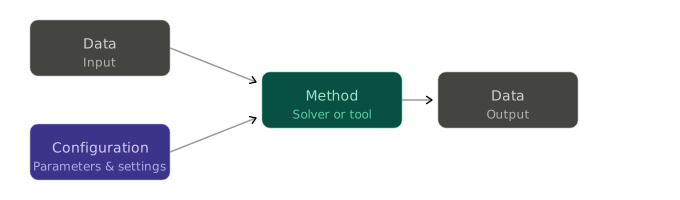
It’s a very simple idea at its core, but the difference is in what a “method” can be. Until now, the methods available were essentially the Analysis Types built and maintained by SimScale — pre-defined workflows giving access to the solvers on the platform. If you wanted to run something that wasn’t on that list — your own solver, a proprietary analysis tool your team has developed over years, a custom Physics AI model — you were working outside the platform, managing it yourself.
Workflows changes that. We are opening up the platform so that methods are no longer hidden under the hood but become visible components that can be built by anyone — SimScale, our partners, or your own engineering team. They run in isolated, containerised environments. They’re governed, versioned, and executed by the same infrastructure as everything else on the platform.
PAMICS®, the meshless Smoothed Particle Hydrodynamics solver from AI Engineering GmbH, is one of the first to integrate natively through Workflows — delivering complex fluid dynamics simulation for moving assemblies, free surface flows, and multiphase applications at 10–20x the speed of traditional grid-based methods, directly inside SimScale. Full details of the PAMICS integration are here. Further integrations are already underway.
Four things Workflows unlock
What’s possible with SimScale is no longer defined by what SimScale has built. It’s defined by what methods exist in the world, and how users wish to use them.

1. Tool integrations — bring your own solver or partner with us
If your team has developed a proprietary solver, modified an open-source tool, or built custom post-processing scripts that are genuinely best-in-class for your application, you’ve always faced the same problem: that capability lives outside the platform. It doesn’t benefit from SimScale’s HPC provisioning. It doesn’t feed into your simulation data management. Your Engineering AI agents can’t reach it. You run it on the side and manually bring results back.
Workflows means you can now register those methods natively in SimScale. Once integrated, they operate inside the same infrastructure as everything else — elastic compute, real-time collaboration, full data lineage, Physics AI pipelines. The solver you built is now a first-class citizen on the platform.
The same logic applies to technology partners. SimScale already offers a range of partner solvers — including the Multipurpose, Electromagnetics, and Marc solvers. Workflows makes integrating new partner technology a more straightforward process, and one that can be self-served to a much greater extent. For solver developers and AI engineering firms, the distribution equation changes: integrate once into SimScale’s method registry, and your solver is immediately accessible to engineering teams already on the platform, with cloud infrastructure, pre-processing, post-processing, and AI tooling already in place. No platform to build. No infrastructure to maintain.
2. User-defined workflows — for simulation leads and automation teams
If you’re running a simulation function across a team of engineers with varying experience levels, one of your constant problems is variance. Two engineers set up nominally identical problems and get different results because they made different assumptions in their models. The issue compounds when multiple analyses need to be run across different physics domains (structural, CFD, thermal, electromagnetics) to ensure that all product requirements are met.
Now you can build templates: pre-configured simulation workflows where the settings that matter are locked, the settings that are appropriate to vary are exposed, and everything irrelevant to the end user is hidden. You define what the workflow looks like for your organisation, and engineers work within that structure. When multiple templated workflows are linked together, you can build a single verification process that automatically runs all of these digital test scenarios.
3. Existing simulation workflows
The Analysis Types in SimScale are straightforward, robust, and easy to use — and this is something our customers tell us they value. These remain unchanged, but now use the new architecture, so that they become building blocks that can be connected together. It means you can initialise boundary conditions from prior results, pipe data between runs, and build multi-step analyses that would have required significant manual intervention before.
For most users, this will be the first place Workflows makes a visible difference. The same tools, made more flexible and adaptable.
4. Advanced simulation workflows — things that weren’t possible before
The more significant change is what you can now chain together that you couldn’t before. Take microclimate analysis — a workflow that involves running multiple parallel simulations, processing interim results, and aggregating them into a final environmental report. Or Design of Experiments (DoE) and optimization loops, where you need to run tens or hundreds of variants, compare results, and feed the best candidates into a next-generation study. These workflows have always been possible via API scripts, but now they are immediately accessible, out of the box.
What this means for Engineering AI
SimScale’s Engineering AI agents already operate across the full simulation workflow — setting up studies, running analyses, interpreting results, flagging issues. What Workflows changes is the scope of what they can reach.
An agent running inside SimScale can now call any registered method, not just the ones SimScale ships natively. That means you can build a workflow where an agent imports a CAD file, selects the appropriate solver from your organisation’s registered methods (including your own), runs the analysis, leverages a Physics AI surrogate model for rapid iteration, validates performance with a physics solver, generates a report, and triggers the next step in the pipeline — all without a human managing the handoffs between tools.
This is the meaningful version of “agentic engineering.” Not an AI that helps you set up a simulation. An AI that operates an entire engineering process.
Engineering AI can also help you build the workflows themselves. If you need to run a complex multi-step analysis, repeatably, an agent can figure out the right sequence of methods, configure the steps, and help you formalise that process into a reusable template. This closes a loop that matters. AI agents can operate deterministic workflows at scale and speed no human team can match.
The infrastructure for this is already in place. Agents don’t need special integration to reach registered methods — those methods are native to the platform, and agents operate at the platform level. AI-native cloud architecture all the way down.
To read the full announcement, see the SimScale Workflows press release. For technical documentation on integrating methods via the Workflow SDK, visit SimScale Docs.