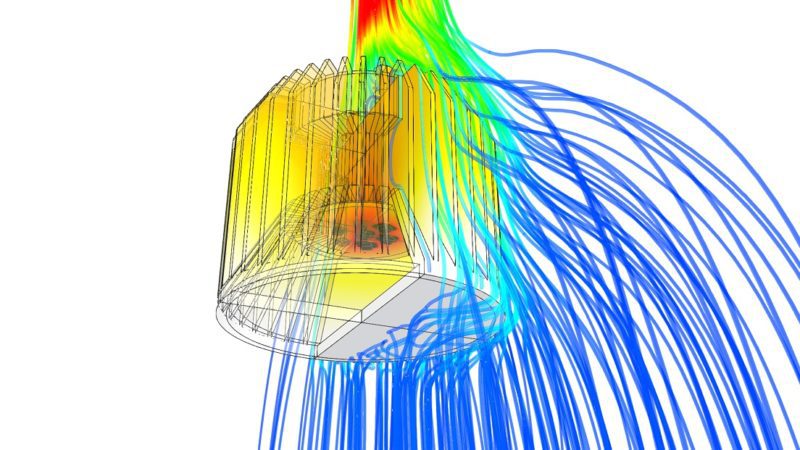
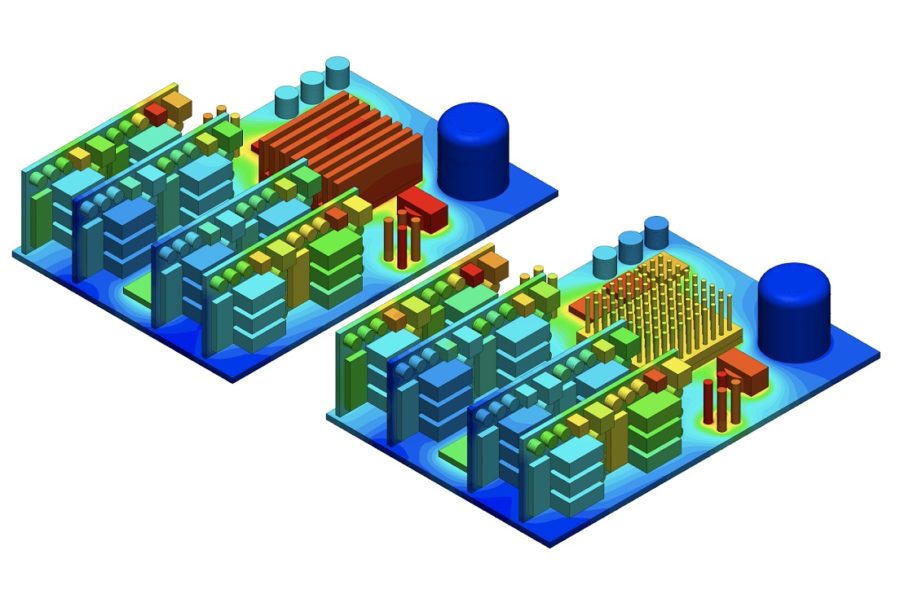
Creating a reliable enclosure for heat dissipation in increasingly small electronic products presents engineers and designers with a variety of choices. Vent it or seal it, add a fan or a bigger heat sink, aluminum or steel, and every choice moves the component temperatures that decide whether the product lasts 10 years or fails in warranty. How can one evaluate the options rapidly, and consequently select the right solution to suit the application? The answer lies in engineering simulation.
This guide covers the three questions an enclosure designer has to answer in order: how much heat the enclosure has to get rid of, which cooling method can do that in the given environment, and how to verify the design before anything is built. Three simulation examples at the end show what a heat sink, a heat pipe, a pair of fans and an active-cooled GPU enclosure each do to the numbers.
To illustrate how heat transfer or thermal simulation helps electrical engineers better anticipate the thermal behavior of an electronics enclosure, we hosted a free 30-minute webinar. Watch the recording below:
What is heat dissipation in electronics?
Heat dissipation in electronics is the transfer of the heat generated by components (chips, power devices, resistive losses in conductors) out of the device and into the surroundings, by conduction, convection and radiation, fast enough that no component exceeds its rated temperature.
The primary challenge of designing an electronic product is thermal management. The amount of heat produced accumulates within the enclosure, potentially damaging the electronic components. Such overheating not only reduces life expectancy but can also lead to product failure. This is true for small handheld devices, controllers, or heavier outdoor devices. The thermal behavior of such components always needs extra attention from the designer and cannot be neglected.
The common design elements aimed at increasing the thermal transfer capabilities of electronics through conduction include [1]:
- Thermal interface material (TIM): These materials are used as filler materials in the gaps between the heat source and heat sinks. They are normally of higher thermal conductivity and help efficiently manage the thermal transfer across the system.
- Heat sink: Heat sinks are the metal components that are in contact with the heat source to remove heat mainly through conduction and sometimes through convection or radiation. Simulating heat sink performance lets you compare materials and geometries before committing to a design. Usually, aluminum or copper are used as heat sink materials, as the thermal conductivity of such metals is relatively high and directly proportional to their heat dissipation efficiency. Since heat transfer takes place through the surfaces, heat sinks are specifically designed in various shapes to ensure large surface areas.
- Heat pipes: Heat pipes are sealed copper or aluminum pipes or tubes containing a fluid. The liquid absorbs heat from the hot surfaces, boils, and enters a vapor state.
- Thermoelectric modules: Thermoelectric modules are devices that employ the Peltier effect, which heats or cools components based on the application of a current to the device. These are always used in conjunction with the heatsink, without which the device might overheat and fail.
- Thermal grease or adhesives: Thermally conductive adhesives or grease is another unique heat transport technique. One of the main advantages is that they bond components together that cannot be bonded mechanically.
As is evident, a designer has a lot to choose from. However, it is not easy to determine the right combination of components to ensure reliable and efficient heat dissipation, while keeping the product as compact as possible. This is where simulation can offer real insight.
Why electronics enclosures overheat
An enclosure overheats when the heat entering it exceeds what its walls, vents or cooling unit can carry away at the allowed internal temperature. Both sides of that balance need a number.
Internal heat sources are everything that dissipates power inside the box: CPUs and power devices, drives and power supplies (a VFD typically loses 3 to 5% of its rating as heat), transformers, contactors, terminals and the conductors between them. Add up the dissipation of every component at its real duty cycle, in watts.
External heat sources are the ones designers forget. Ambient air at 40 °C instead of 20 °C halves the temperature headroom. Direct sun on an outdoor cabinet adds up to roughly 1,000 W/m² of irradiance on the lit faces, and a dark coating absorbs most of it. Nearby machinery, ovens or a second cabinet mounted flush against the first all raise the effective ambient.
The reason the balance matters so much is the rule of thumb every thermal engineer carries: for silicon devices and electrolytic capacitors, every 10 °C of sustained temperature above the rated operating point roughly halves component life. An enclosure that runs 20 °C hotter than designed does not fail on day one. It fails in year two, in the field.
For the mechanism behind the three modes of transfer, see what is heat transfer in the SimWiki.
How to calculate enclosure heat load
Start with the total internal dissipation Q in watts, because every other sizing decision is derived from it. If you need the unit conversions or want to work from current and voltage, use our guide on how to calculate heat dissipation in watts.
Step 1. Sum the internal heat load. Q_internal = Σ (component dissipation at duty cycle). Vendor datasheets give the figure directly for power devices; for conductors use I²R.
Step 2. Add external gain if the enclosure is outdoors. Q_solar ≈ A_lit × S × α, with S the solar irradiance (use 1,000 W/m² as a worst case), A_lit the sunlit wall area and α the surface absorptivity (about 0.9 for dark paint, 0.3 to 0.5 for light paint or bare aluminum).
Step 3. Check whether the walls alone can do the job (sealed enclosure, natural convection). The heat a sealed cabinet sheds through its walls is approximately Q = k × A × ΔT, where A is the free surface area (subtract any wall against a floor, a wall or another cabinet), ΔT is the allowed rise of internal air over ambient, and k is an effective wall heat transfer coefficient. For painted sheet steel in still air k ≈ 5.5 W/(m²·K) is the usual planning value; aluminum sheds more, plastic housings less. Rearranged, ΔT = Q / (k × A) tells you how hot a sealed box will run.
Step 4. If that ΔT is too high, size forced ventilation. For a vented enclosure with fans, the airflow needed to carry Q at an air temperature rise ΔT is V ≈ 3 × Q / ΔT in m³/h (Q in watts, ΔT in kelvin). In US units the same relation is CFM ≈ 3.16 × Q / ΔT_°F, or CFM = (Q × 3.41) / (1.08 × ΔT_°F) with the load first converted to BTU/hr. Add 15 to 20% margin for filter clogging and fan curve droop.
Step 5. If the enclosure has to stay sealed and the walls can’t cope, the heat needs a closed-loop device: an air-to-air heat exchanger, an air-to-water heat exchanger, a thermoelectric cooler or an enclosure air conditioner, sized in watts (or BTU/hr) at the real ambient.
Worked example. The forced-convection enclosure simulated later in this article carries 100 W of electronics, 40 W of it on one CPU. Two fans each supply 0.014 m³/s, so V = 0.028 m³/s ≈ 100 m³/h. From step 4, the bulk air inside should rise only about 3 K above the 20 °C inlet. The simulation nevertheless shows components above 70 °C. That gap is the whole point of the next sections: hand calculations size the cooling for the average, and the components that fail sit in the corners the average never reaches.
Electrical enclosure cooling methods compared
Pick the cooling method from the environment first and the heat load second. The protection rating decides whether outside air may enter the enclosure at all, and that single constraint removes half the options.
Passive methods (no moving parts, no power, no maintenance)
- Conduction paths inside the box: heat sinks, heat pipes, TIMs and thermal pads move heat from the chip to the wall. This is the component-level toolkit from the list above, and the first simulation example quantifies it.
- Surface area and material: a larger or finned enclosure, aluminum instead of steel, and a light coating on outdoor cabinets all raise the wall’s heat rejection without opening it. For the trade-offs between fin geometry, material and airflow see our heat sink design guide.
- Natural convection venting: louvers low and high on the enclosure let the chimney effect pull cool air through. Cheap and silent, but it drops the ingress protection to roughly IP30/NEMA 1 and only works for modest loads.
Active methods (fans, pumps or refrigerant)
- Filtered fans (forced ventilation): the lowest-cost way to move real heat, usable when the ambient is cooler than the allowed internal temperature and the air is clean enough to filter. Typically compatible with NEMA 12 / IP54 with the right filter; incompatible with NEMA 4/4X washdown ratings. Our post on electronics cooling using fans covers fan curves and placement.
- Air-to-air heat exchangers: two separate air loops over a heat-pipe or plate core; the enclosure stays sealed. Capacity is quoted in W/K, and it only works when ambient is below the internal setpoint.
- Air-to-water heat exchangers: for plants with a chilled-water loop; high capacity, sealed, independent of ambient air temperature.
- Enclosure air conditioners (closed loop): cool below ambient, keep the enclosure sealed (NEMA 4/4X, IP65/66), and cost the most to buy and run.
- Thermoelectric (Peltier) coolers: sealed, no refrigerant, no compressor, suited to small loads (tens of watts) and small cabinets.
- Vortex tubes: compressed-air driven, no electrics, used where plant air is available and hazardous-area rules exclude motors.
Choosing between them
| Environment | Heat load | Ambient vs internal limit | Start with |
|---|---|---|---|
| Indoor, clean, NEMA 1 / IP30 acceptable | any | ambient cooler | Natural convection vents, then filtered fans |
| Indoor, dusty or oily, NEMA 12 / IP54 | low | ambient cooler | Larger surface area, heat sinks through the wall |
| Indoor, dusty or oily, NEMA 12 / IP54 | medium to high | ambient cooler | Filtered fans or air-to-air heat exchanger |
| Washdown, outdoor, NEMA 4/4X / IP65+ | any | ambient cooler | Air-to-air heat exchanger, thermoelectric for small loads |
| Any sealed enclosure | any | ambient hotter than limit | Enclosure air conditioner or air-to-water heat exchanger |
| Hazardous area, plant air available | low to medium | any | Vortex tube |
The underlying choice between passive and active is covered in more depth in active vs passive cooling; the system-level view, from chip to rack, is in our electronics thermal management pillar. Battery packs have their own rules (cell temperature uniformity matters as much as peak temperature) and are covered in battery cooling: challenges and solutions.
Enclosure thermal management: a design checklist
The cooling unit is only half of enclosure thermal management. The layout inside the box decides whether the cooling reaches the components that need it.
- Put the hottest components where the air leaves, high in the enclosure for natural convection, downstream of the fans for forced ventilation, so they don’t preheat the air for everything else.
- Keep a clear path from inlet to outlet. Cable looms, DIN-rail covers and ducting that block the flow produce the dead zones that overheat. Leave at least the vendor’s clearance (typically 50 mm) above and below heat-generating drives.
- Mount heat-producing devices on the wall, not in free air, so the wall becomes part of the heat sink. Die-cast aluminum enclosures work as a heat sink in their own right.
- Match the enclosure rating to the cooling method before anything else is chosen. A NEMA 4 box with a NEMA 12 filter fan is a NEMA 12 box.
- Size for the worst case: maximum ambient, full sun, every drive at full load, clogged filters at end of maintenance interval.
- Derate for altitude and mounting. Above 1,000 m, air cools less; a cabinet in a row sheds heat from fewer walls than one standing free.
- Plan for condensation. A sealed cabinet that cools below the dew point at night sweats in the morning. Outdoor and washdown enclosures usually need a thermostat-controlled heater as well as cooling.
- Monitor. A thermostat or temperature sensor with an alarm at 80 to 90% of the rated limit costs a few dollars and turns a field failure into a maintenance ticket.
- Verify the design before tooling. Hand calculations give the bulk air temperature. Only a thermal simulation or a physical prototype gives the component temperatures, and simulation gives them before the prototype exists.
Heat dissipation simulation
One of the best approaches a designer can take to overcome this problem is to run a thermal simulation on the electronics enclosure before the actual product is manufactured. This simulation can help find answers to many critical questions: How effective is the cooling system? What possible design changes need to be implemented? How does the selected material impact the heat transfer behavior? And many more, depending on the nature of your product.
The need to manufacture safer and more compact electronic devices is challenging engineers across the globe to create extraordinary designs. In the traditional design process, the only way to ensure the durability of a novel electronic product is to perform a high number of design iterations until all criteria are met. This implies a high number of physical prototypes and a time-consuming and expensive physical testing process.
In addition to the number of design iterations, the stage at which design changes need to be implemented is equally important; the earlier in the overall process, the more cost-effectively a design change can be realized. The later the stage, the scope of possible design changes narrows drastically, with only small, incremental design modifications possible.
Of course, physical tests cannot (and should not) be entirely eliminated from the product design process. Physical and virtual prototyping are not mutually exclusive; they are complementary. But with computer-aided engineering (CAE) the days, weeks, or months of physical testing are replaced with hours or even minutes of a simulation run.
QRC Technologies prevented thermal damage in its electronics design with SimScale. Over 5 iterations tested, 6 weeks saved, and $40K average savings on hardware.
Two analysis types cover enclosure work. A pure solid thermal analysis (FEA) is enough when the question is conduction through heat sinks, pipes and pads, as in the first example below. When the airflow itself is the unknown, a conjugate heat transfer (CHT) simulation couples the solids with the air, as in the second and third examples. Our guide on how to run a CHT simulation covers the setup choices.
The three case studies below illustrate how simulation can be a handy tool to help you predict the performance of a product and make smart design decisions.
Download Electronics Cooling: The Ultimate Guide (PDF) to learn everything you need to know about modern electronics cooling.
Example 1: Thermal simulation of an electronics enclosure with heat sink, heat pipe and TIM
The purpose of this project is to perform an FEA thermal simulation on an electronics enclosure without the need for conjugate heat transfer analysis. This thermal simulation project is part of the SimScale Public Projects Library and is freely available to view, copy and modify. Three design variations of a realistic industrial enclosure design of a controller are considered:
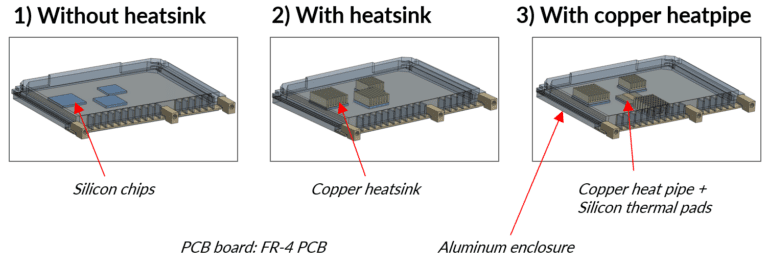
The above CAD geometries represent a complete assembly of a controller, which includes a printed circuit board (PCB), chips as the heat source, and an enclosure. Design 1 (left) is a basic design with silicon chips and an aluminum enclosure. Design 2 (middle) has a heat sink installed within the system, while Design 3 (right) has a heat sink, a copper heat pipe, and silicon thermal pads. Let’s see how they perform compared to each other.
Simulation setup
The step-by-step simulation setup is detailed below:
Step 1. A linear transient heat transfer analysis type is selected to compute the temperature distribution and heat flux on the entire body.
Step 2. Tet-dominated element type meshing is used with local mesh refinements. A tet-dominated meshing algorithm is used to mesh the entire geometry. Local mesh refinements are also applied to the areas of interest, such as the contact and small faces. This ensures that the corresponding elements are intact and produce accurate results. The figure below shows the meshed geometry with refinements.
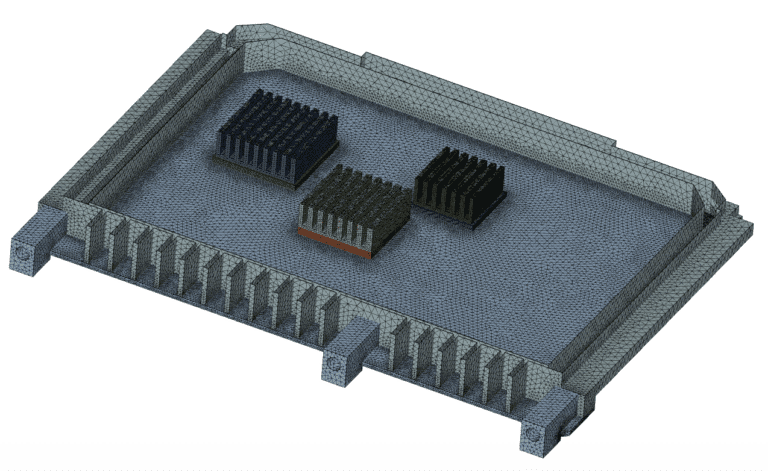
An automated mesh setting of moderate mesh fineness is applied to the chip volumes and fine mesh fineness is applied to the remaining faces of the body.
Step 3. On completion of the meshing, the points of contact are constrained by using bonded contact conditions between the printed circuit board (PCB) and chips, chips and heat sinks, and the PCB and enclosures. Following this, the materials are defined. The material properties pertaining to the following components are shown in the table below with their corresponding density, specific heat, and conductivity.
| Component | Material | Density kg/m³ | Specific heat [J/(kg K)] | Conductivity [W/(m K)] |
|---|---|---|---|---|
| PCB | FR-4 | 1850 | 600 | 0.3 |
| Chips | Silicon | 2330 | 705 | 0.2 |
| Heat sink | Copper | 8960 | 385 | 401 |
| Enclosure | Aluminum | 2700 | 897 | 235 |
Step 4. The boundary conditions are then set up with a volume heat source applied as a thermal load to the electronic chips and a convective heat flux to the outer surfaces.
Thermal simulation results: 95.8% increase in heat dissipation
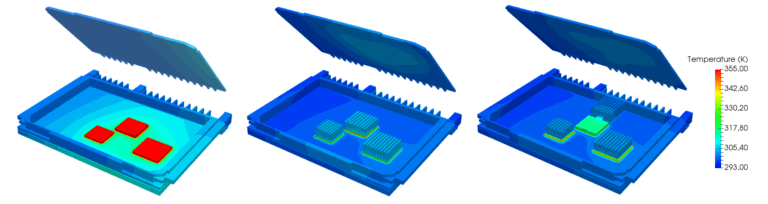
The temperature and heat flux distribution are visualized for all three cases:
Temperature distribution
Heat flux distribution
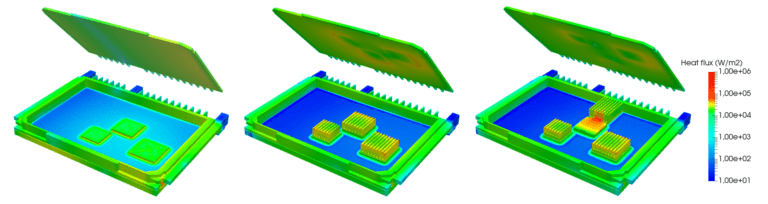
From the simulation results above, it can be seen that the chips get extremely hot (715 K) in Design 1 due to the absence of a heat dissipation material. Heat removal here is mainly due to the aluminum enclosure material and the silicon chips are clearly overheated. At the same time, the heat sink in Design 2 helps remove the heat from the chips. Heat dissipation is 12.6% higher here compared to Design 1 (see the charts below for detailed numerical results).
The addition of highly conductive materials with a low convective heat transfer coefficient (the copper heat pipe in Design 3) increased the heat transfer efficiency drastically. Though thermal interface materials (the silicon thermal pads in Design 3) are expensive, establishing contact layers between the chips and heat sink improves the thermal coupling between parts and dissipates heat even faster and more efficiently. As a result, heat dissipation is 95.8% (!) higher in Design 3.
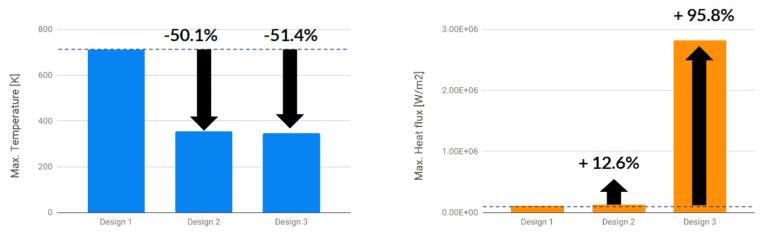
The maximum values of the temperature and heat flux are shown in the table below:
| Design | Configuration | Max temperature (K) | Max heat flux (W/m²) |
|---|---|---|---|
| Design 1 | Without heat sink | 712 | 1.18e+05 |
| Design 2 | With heat sink | 355 | 1.35e+05 |
| Design 3 | With heat sink + TIM + heat pipe | 346 | 2.82e+06 |
Potential further design improvements that could be investigated using simulation are, for example, using an aluminum heat sink, which is cheaper and nearly 60% lighter than copper, or different TIMs with varying thicknesses.
It is evident that the selection of appropriate components and materials for the conduction of heat in electronics is one of the key design decisions. Copper, for instance, has a thermal conductivity 1.8 times higher than aluminum. In addition, copper heat pipes can also further increase thermal conductivity, far more than copper heat sinks. At the same time, the choice of aluminum can also be justified, since it is cheaper and lighter, increasing the durability and efficiency of the electronic components.
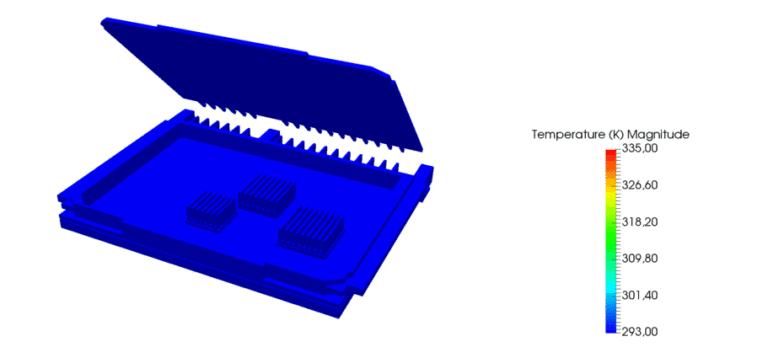
This is just one example of how thermal simulation can help designers or engineers evaluate their design using simulation. Use the free project template of the case study in this article if you are interested in how additional design changes would impact thermal performance.
Example 2: Forced convection cooling of a densely packed enclosure
The first example moved heat from chip to wall. This one asks the next question: once the heat is at the wall, can two fans carry it out, and where inside the box does the airflow fail to reach? It uses conjugate heat transfer (CHT), which couples conduction in the solids with convection in the air, and is available as a forced convection cooling example in the SimScale public projects library.
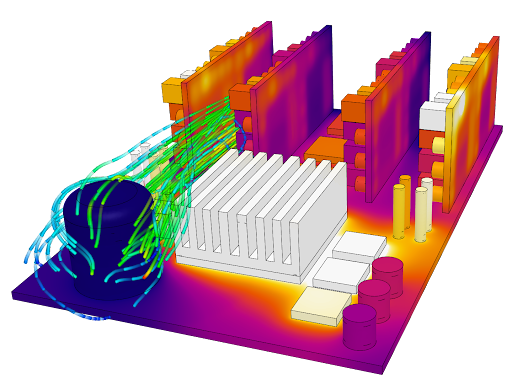
The conjugate heat transfer (CHT) analysis type in SimScale enables heat transfer analysis between solid and fluid domains by transferring energy (thermal) at the interfaces (contacts) between them. This means that the model must contain at least one fluid and solid region. In most cases, a CAD geometry will not have a fluid domain assigned as default. The SimScale CAD mode provides a flow volume extraction tool to do this. Typical applications of CHT analysis type include analysis of heat exchangers, cooling of electronic equipment and electronics enclosures, LED luminaire design, and similar cooling and heating systems. Both incompressible and compressible flows can be modeled including the impact of radiation heat transfer. Both fluid and solid domain mesh are required for a CHT simulation with clear definitions of the fluid and solid interfaces or contacts. With these interfaces properly defined, the mesh is automatically taken care of in SimScale.
Avoid electronics enclosure overheating with active cooling
In the example of the forced convection cooling case, the key design considerations that are explored include the velocity and temperature distributions across electronic components and their dependence on fan (forced convection) inlet speeds. Multiple heat sink designs can also be simulated in parallel for comparison.
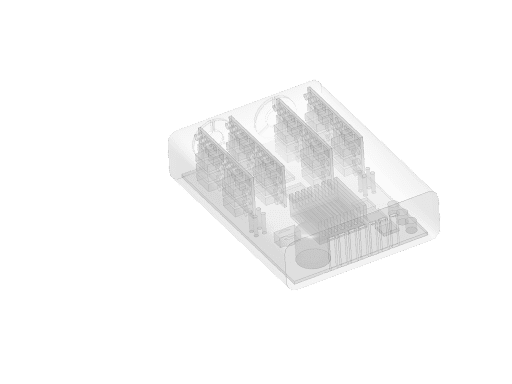
The case in question is the heat transfer analysis (cooling) of densely packaged electronics inside an enclosure. The simulation setup is as follows:
- A conjugate heat transfer (CHT) simulation is used to model conduction in solids and forced convection (air).
- There are two inlet fans (simulated) providing forced convection into the electronics enclosure. Two velocity inlet boundary conditions where the fans would be on one end, give a ventilation rate of 0.014 m³/s per fan at ambient conditions (20 ℃). The other end of the enclosure has openings using a pressure outlet boundary condition.
- The fan flow rate is constant. For more detailed analyses, a custom fan performance curve can also be uploaded into the SimScale platform.
- Materials including silicon, tin, copper, aluminum, and polylactic acid (PLA) have been assigned to the electronics enclosure, boards, and components using the extensive material library. Custom materials can also be defined.
- Heat transfer coefficients (HTC) are applied to the walls.
- Electronics components receive electrical power and generate heat (e.g. resistive losses). The heat load from each component can be defined by assigning an absolute power source in watts. Various thermal loads and power sources from IC chips, resistors, etc. have been defined totaling 100 Watts with the single largest load being the main CPU at 40 Watts.
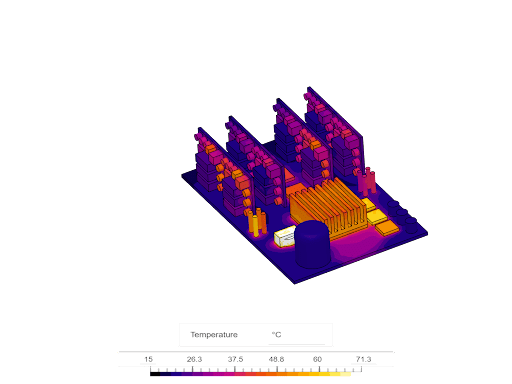
Simulating heat transfer for better electronics design
The simulation takes approximately 30 minutes to run. Because of the high-density power electronics in a confined space, we observe high temperatures on some of the components because not enough airflow is reaching those parts. The SimScale platform allows users to easily alter the flow rate, reposition the supply fans, or employ a combination of the two.
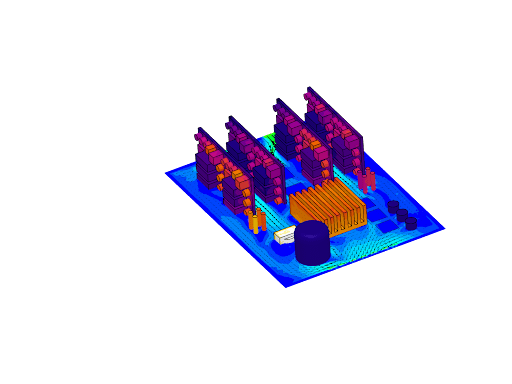
A design study on the heat sink, using various materials, or altering the number and spacing of fins, can also be undertaken at this stage. Importantly, when users set up and run these alternative designs, running all of them together simultaneously would still only take 40 minutes, saving considerable time when compared to sequential runs. Simulating heat transfer analysis at the early stages of design can give designers more options to finalize a design before spending money on costly prototyping.
Evaluate the electronics enclosure cooling design and learn more about simulating forced convection cooling from a web browser, in our on-demand webinar, Thermal Analysis of an Electronics Enclosure: Forced Convection Simulation.
Example 3: Active fan cooling of a GPU-on-the-edge enclosure
Electronic enclosure cooling systems are employed to effectively dissipate heat from sealed electrical and electronic enclosures operating in indoor, outdoor, and other types of environments. These systems are used for applications ranging across a vast array of industries, including but not limited to industrial automation, chemical, wastewater treatment, telecommunications, petrochemical, and so on. Here are two further thermal management examples of how enclosure cooling strategies can be evaluated within SimScale.
This thermal analysis of a graphics processing unit (GPU) enclosure shows how an industrial application can be tested. The simulation results help one to visualize how heat is distributed within a GPU on the edge, cooled via an active fan from the top of the enclosure.
Edge computing hardware is the use case where enclosure cooling decides the product: a GPU that would sit in an air-conditioned server room is instead mounted on a factory wall or a pole, often inside a sealed box. OnLogic, which builds fanless industrial computers for exactly that environment, used SimScale to test its passive enclosure designs and saved $3 in material per unit.
How to get started with enclosure cooling using SimScale
In this programmable heating mantle public project, the CAD model (created in Onshape) consists of components including casing, structural, and electronics parts. The enclosure cooling challenge comes as the initial design goal (heating up containers) must also comply with working conditions of mechanical stress, safety, ergonomy, and thermal load to make sure the final product will work effectively. Once the CAD is developed in Onshape, we will then assess the thermal management through thermodynamic simulation using SimScale. Read all about this case study here.
For more ready-made starting points, the electronics cooling simulation templates post lists five public projects you can copy, and the electronics box CHT tutorial walks through a full enclosure setup step by step.
Frequently asked questions: electronics enclosure heat dissipation
Heat dissipation is the removal of the heat that electronic components generate while operating, moving it through the enclosure and into the surroundings by conduction, convection and radiation. A device dissipates heat well when every component stays below its rated temperature at the worst-case ambient.
Conduction (heat moving through solids such as a heat sink or the enclosure wall), convection (heat carried away by moving air or liquid, either naturally or by a fan or pump) and radiation (heat emitted from surfaces as infrared). Most enclosure designs rely on conduction to the wall and convection from it; radiation matters for sealed outdoor cabinets and hot, dark surfaces.
Add up the power each component converts to heat, in watts, at its real duty cycle. Datasheets give the figure for drives and power supplies (typically 3 to 5% of a VFD’s rating); for conductors use I²R. Convert to BTU/hr by multiplying by 3.41 if your cooling vendor sizes in those units. Our heat dissipation in watts guide covers the conversions.
Estimate the sealed-enclosure temperature rise as ΔT = Q / (k × A), with Q the internal load in watts, A the free surface area in m² and k ≈ 5.5 W/(m²·K) for painted steel. If ambient plus ΔT exceeds the lowest component rating (often 40 °C for drives, 60 °C for most electronics), the enclosure needs venting, fans or a closed-loop cooler.
Copper conducts heat about 1.8 times better than aluminum, but aluminum is cheaper and roughly 60% lighter, which is why aluminum enclosures and heat sinks are the default and copper is reserved for heat pipes and spreaders where the extra conductivity pays off. Steel cabinets shed heat less well through their walls and depend more on venting or cooling units; a light coating helps outdoors.
Yes, up to the limit of what its walls can shed. Increase surface area or wall conductivity, mount heat sources on the wall, use through-wall heat sinks, or add a sealed device such as an air-to-air heat exchanger, a thermoelectric cooler or an enclosure air conditioner. A CHT simulation tells you which of these is enough before you buy any of them.
SimScale: thermal simulation online
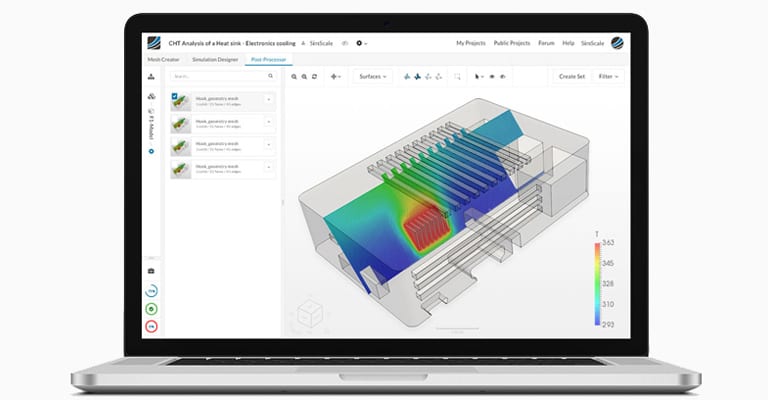
Why aren’t all designers using simulation yet? Several barriers have prevented more widespread adoption of simulation tools by electrical engineers and designers, and here’s how SimScale is aiming to challenge this status quo:
- Accessibility: Traditional software needs to be installed locally on expensive high-performing computers, which just remain idle most of the time. With SimScale, all computations run in the cloud; all that is needed is a web browser.
- Operating costs: Standard commercial simulation software packages are notoriously expensive. With SimScale, there is an option to start simulating right away with a Community Plan.
- Know-how: Most modern tools are designed for experts and experienced simulation engineers. To bridge that knowledge gap, SimScale has a large public projects library, free training, and live support via chat.
The SimScale Public Projects Library has a wide selection of simulation templates covering various aspects of electronics simulation and heat sink design, including thermal resistance, energy efficiency, cooling management, and heat dissipation.
Download the free case study Thermal Performance of a PCB (PDF) to see how the thermal performance of a printed circuit board was investigated with SimScale.
Simulate your own enclosure design
Get instant access to CFD and FEA in the web browser and simulate your own design in minutes by creating a free account on the SimScale platform, no credit card required.
References
[1] Davis, Sam. ENGINEERING ESSENTIALS-Shrewd Thermal Management Helps Defeat The Heat-Optimization of thermal controls will significantly enhance electronic system reliability. Electronic Design 55.21 (2007): 41-46
[2] Thermal management (electronics), https://en.wikipedia.org/wiki/Thermal_management_(electronics)