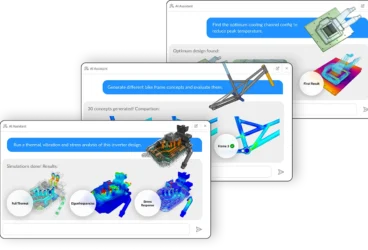
On April 23, we dived deep into an end-to-end agentic workflow in SimScale. It was a great live session in which Dr. Steven Lainé (Director of Solution Engineering) walked us through a complete, unedited RFQ workflow — geometry upload to design recommendation — powered by SimScale’s Engineering AI agent. Here are the five things engineering leaders took away.
Watch On Demand
Watch the full live demo of SimScale’s Engineering AI agent running a gearbox RFQ workflow from geometry upload to design recommendation.
1. The Bottleneck Isn’t Compute — It’s Dead Time
Software agents already achieve 80%+ scores on coding benchmarks by iterating autonomously in seconds. Hardware teams are still waiting 2–8 weeks between simulation cycles. That gap isn’t compute time. It’s the accumulated cost of handoffs, queues, and repetitive setup every time a simulation is requested.
Engineering AI targets exactly that dead time — and the design exploration that becomes possible when it’s eliminated is where the business value shows up.
2. Production Results Are Now Measurable
SimScale’s State of Engineering AI 2026 survey (350 engineering leaders across the US, UK, and Germany) surfaced three numbers from teams running Engineering AI in production — not pilots:
- 3x more design variants explored per program
- 3x faster RFQ response window, end to end
- ~90% of companies are actively putting governance in place to permit autonomous AI action in their design processes
These are outcomes from teams that have crossed the pilot threshold. They’re now pulling ahead of the cohort still planning their first use case.
3. Agentic ≠ Scripted — The Difference Is Resilience
Scripted workflows work when inputs are perfectly predictable. A part named “fastener” instead of “bolt,” a missing boundary condition in the RFQ, a slight geometry deviation — any of these silently breaks a script.
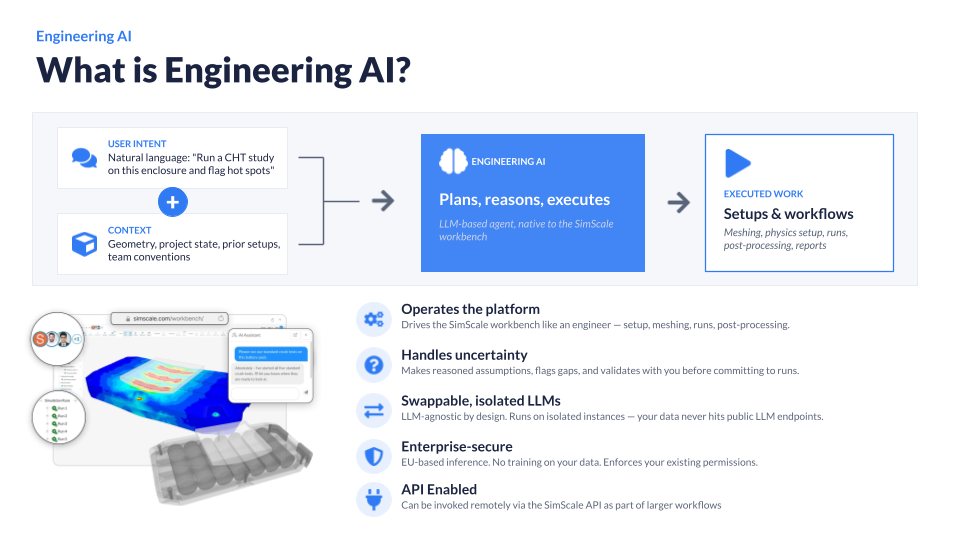
An agentic workflow operates on intent. It reads the RFQ PDF, inspects the CAD geometry, reasons about what it finds, and flags ambiguities before proceeding. It doesn’t need the bolts named correctly — it understands “fastener,” “screw,” even a typo. When something is missing, it asks, waits, and continues. This flexibility is what lets agentic workflows scale to non-specialist engineers without sacrificing simulation quality.
4. What the Live Demo Actually Showed
Steve ran an electric drive motor gearbox RFQ live, acting as a non-specialist design engineer. Without touching a single setup field, the agent:
- Parsed the RFQ PDF and identified analysis types, materials, boundary conditions, and acceptance criteria
- Inspected the CAD assembly and located fixing points, bolted joints, and acoustic radiator surfaces
- Planned and executed a two-phase workflow: modal frequency analysis (first 20 modes) followed by a harmonic analysis for Equivalent Radiative Power (ERP)
- Assigned materials, detected 137 bonded contacts, applied bolt preloads, and set fixed supports — entirely autonomously
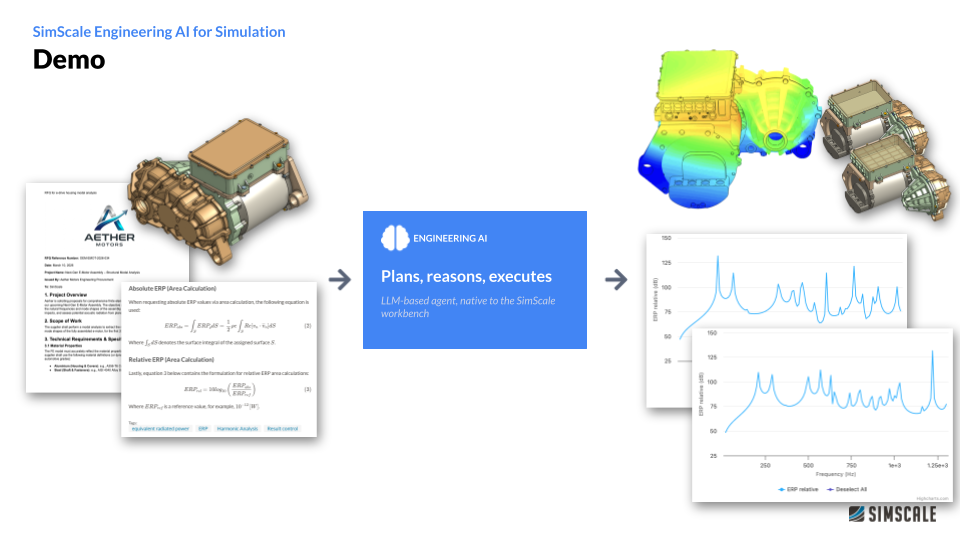
Results: modal frequency passed at 160 Hz+ with a 13.5% margin. But the harmonic analysis flagged a 240 Hz ERP peak at 132 dB as a showstopper — a low-frequency boom that would resonate through the cabin, felt through seats, floor, and steering wheel.
The agent recommended adding stiffening ribs to the cover plate. Steve did that, re-ran V2 with the agent, and the 240 Hz peak was significantly attenuated. A multi-week specialist workflow, compressed to a session — with one engineer in oversight.
5. Creating an Agent Takes Minutes
Steve built a custom RFQ agent live to show how fast deployment actually is:
- Write a plain-language description of what the agent does
- Add natural language instructions (the same way you’d brief a new team member)
- Optionally upload documentation — SOPs, standards, past simulation results — as a knowledge base
No training. No code. The agent is immediately available to every engineer in the organization via the SimScale dashboard, and can be invoked via API to slot into larger, multi-software automated pipelines. Agents work across all SimScale physics — structural, thermal, CFD, electromagnetics — with Physics AI integration coming next.
The knowledge that makes an agent effective is already in your organization. Capturing it once is all it takes to scale it to everyone.
SimScale’s Engineering AI is in early access. Join the waitlist or request a demo to see it running on your workflows.