
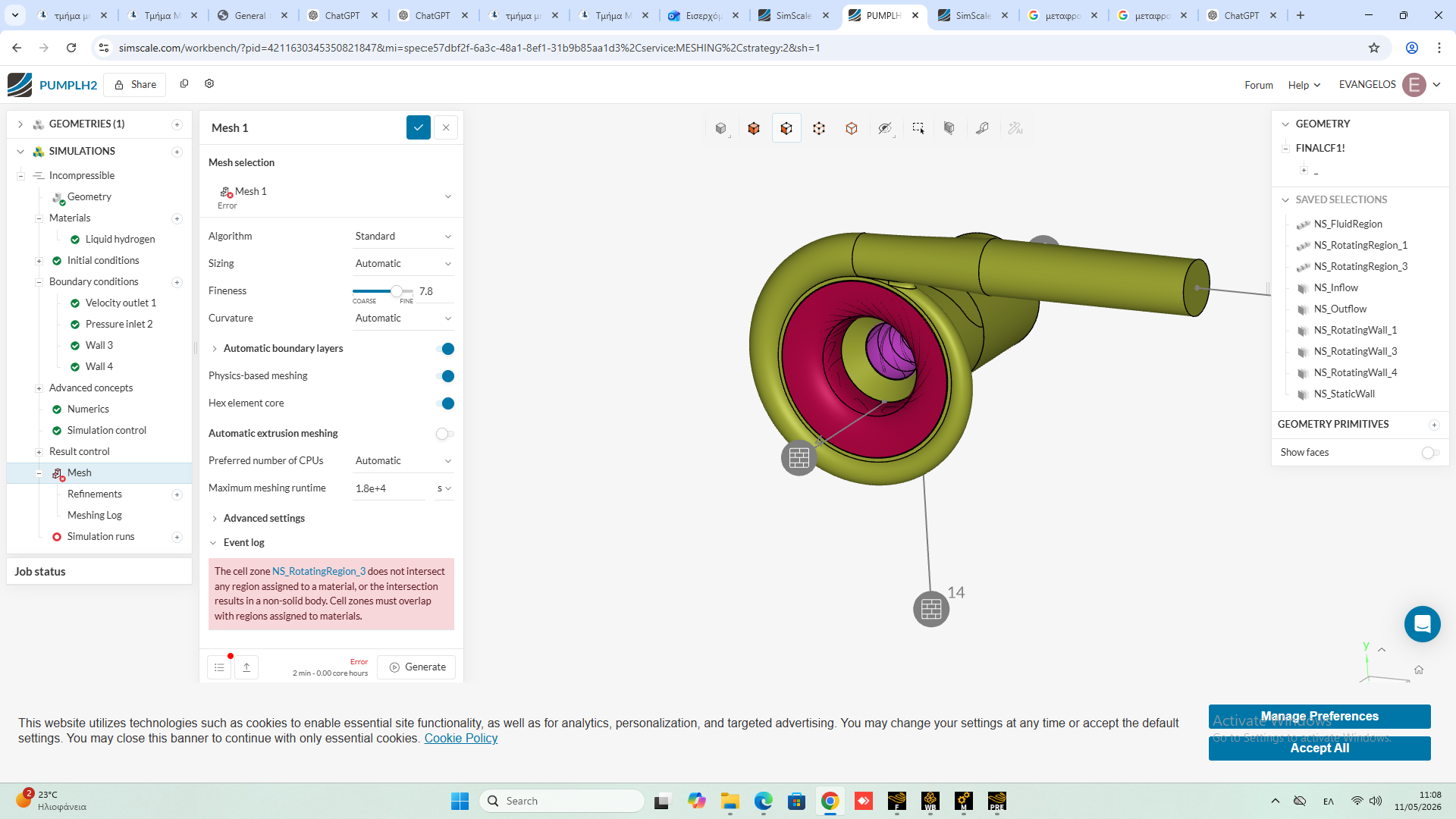
I am facing an issue: I cannot generate the mesh because of the error message shown in the image. I understand that this issue can occur with the Multi-purpose Dens solver, but I selected the Incompressible solver since I want to run the simulation using the k-ω SST turbulence model.
Sorry, I meant that I wouldn’t have this problem with the Multi-purpose solver.
Hi @evangtsichlas,
Yes this shouldn’t occur in a multi-purpose simulation but could appear in an Incompressible simulation.
For any setup using a rotating zone, the rotating volume must be defined as a valid cell zone and it must overlap a solid 3D region that has a material assigned.
So this error usually means NS_RotatingRegion_3 is one of these:
-
outside the fluid/solid volume,
-
only intersecting faces/sheets, or
-
not matching the material region after CAD/boolean operations.
If the issue still persist, would it be possible for you to share the project url and make sure that the project is shared with supper if it is a private project?
I would also highly recommend you to take a look at this tutorial, as this is also a turbomachinery incompressible simulation involving rotating region.
Thanks!
Bryan
Hi BryanArsenio,
Thank you for your support. Thank you for your support. I am sending you the project link below.
Hi @evangtsichlas ,
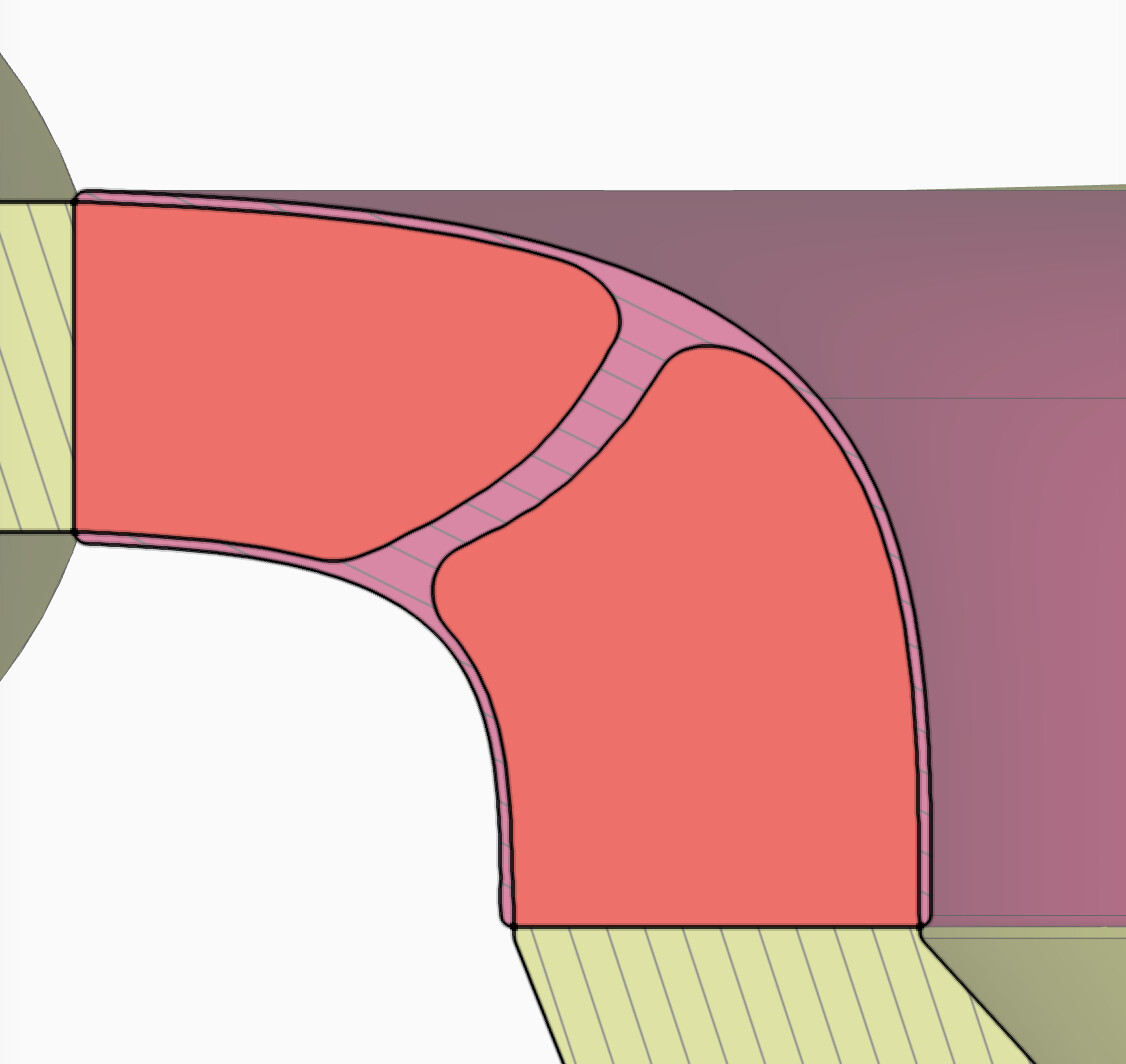
I have checked your simulation and the reason for the failed mesh is because one of your rotating zone geometry (specifically “NS_RotatingRegion_3”) is out of the fluid region, see attached image where yellow is the fluid region, and since Physics-based meshing setting is turned on, the error;
“The cell zone NS_RotatingRegion_3 does not intersect any region assigned to a material, or the intersection results in a non-solid body. Cell zones must overlap with regions assigned to materials.”
Thanks!
Bryan
Thank you for your support. I also have an outer solid wall (shroud) connected to the inner wall of the screw (inducer). Interestingly, this issue does not occur when I use the Multi-purpose Solver. However, unless I am mistaken, the Multi-purpose Solver does not support the k-ω SST turbulence model, which is why I chose the incompressible solver instead.
The reviewers of the article I am currently preparing have specifically requested the use of the k-ω SST turbulence model in the simulations.
Could you suggest any alternative approach or workaround that I could propose? For example, is there another method or model that I could apply while still satisfying the reviewers’ requirements?
Hi @evangtsichlas,
I’m sorry I made a small mistake in my previous response, while its true that the error is directly because of the rotating zone volume being partially outside of the flow region, but that is normal and it is the recommended workflow, the actual problem is because you did not include the rotating zone volumes to your material assignment, which is also why the error occurs, and you also did not create a rotating zone assignment under advance concept which made the physics based meshing less accurate.
I would highly recommend you to take a look at this tutorial which includes the creation of rotating zones in an incompressible simulation.
Additionally to answer your question, I would still recommend you to use the incompressible simulation type with k-ω SST turbulence model, to capture both turbulence in the near- and far-wall region.
Thanks!
Bryan
From the tutorials and documentation I studied, I understood that, in the incompressible solver, the rotating zones must be located entirely within the flow volume in order for the simulation to work properly. Please correct me if I am mistaken.
Thank you for your support and assistance.
Yes you are right, for the Incompressible solver with MRF rotating zones, the rotating cell zone must be a valid 3D volume inside the flow region/material-assigned domain. If it does not intersect a material region, SimScale throws exactly the error you saw.
Thank you