Very fresh user to SimScale. I have read as many of the user guides as possible and followed some of the tutorials.
This is a design for a camelback straightedge which is a long cast iron item that has a super flat bottom to be used in metalwork machine rebuilding. I ultimately wish to test how much it bends when supported at the ends under its own weight.
I have loaded up my CAD design and have tried many different ways to create the mesh. So far I have been unable to get the Aspect Ratio and TET Aspect Ratio figures anywhere near a maximum of 100. I tried to run a simulation anyway but it errored out.
I have tried using the original automatic settings, selecting Course and Fine. I have tried manually entering several different sizes. I have tried creating several Surface Custom Sizes and a Custom Volume Size to no avail (the last meshing process took 58 minutes then “ran out of memory” before finishing!!
This design has some 1mm radiuses on multiple edges which I feel might be causing the issue.
Rather than keep chewing through my CPU hours can anybody give me some pointers if that is not asking too much?
Interesting project. Taking a quick look at it, the successfully generated mesh settings were not so bad earlier, in my opinion, at least for an initial run. The boundary conditions however are, in a way, incomplete.
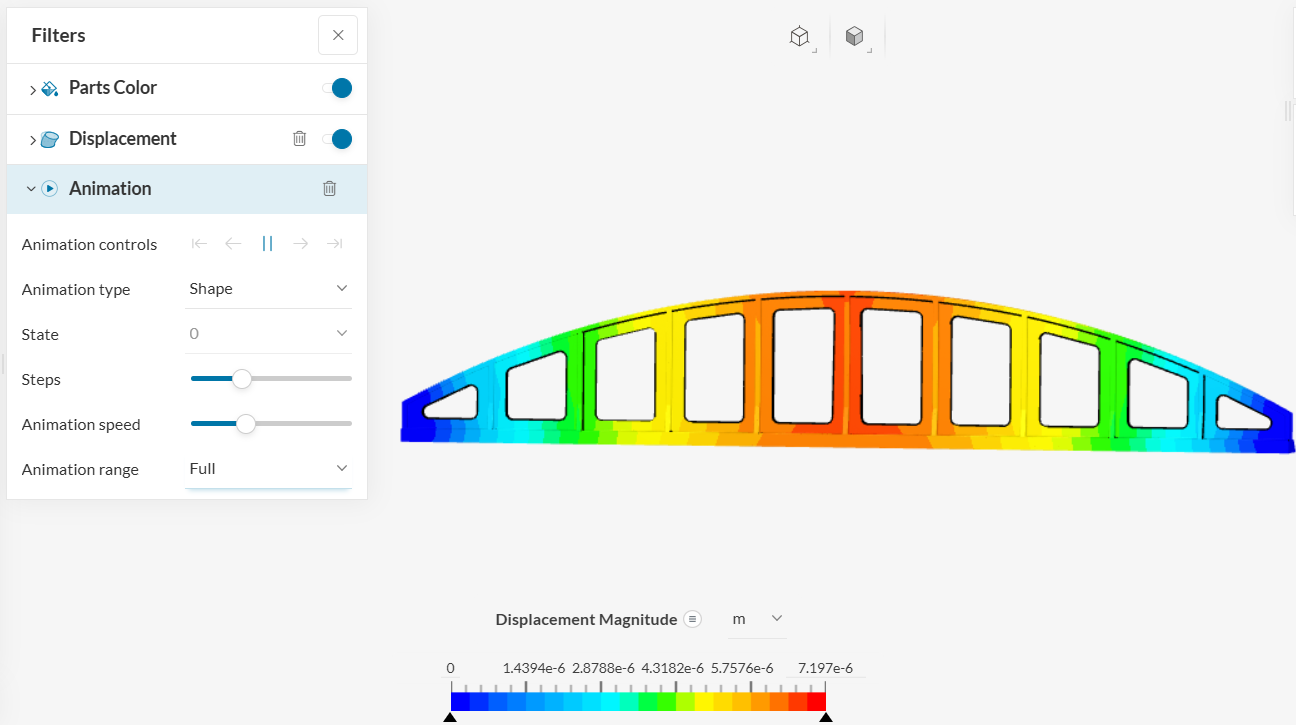
The model is under-constrained to be able to run a simulation, hence the long runtime. I tried changing the fixed value to fixed support on my end. This then added a constraint in every direction (as opposed to the current constraint only in y direction) and I got a successful simulation run in under 10 mins, everything else left unchanged.
Alternatively, you can add the constraints in other directions to other faces if you wish, depending on how you want to model it, and that should also do the trick. You will then be able to see the displacement, stress results, etc. for the model:
Thank you Satvik. Yesterday I was able to get the model to mesh with all parameters within the suggested ranges. The simulation however ran out of memory twice after a LONG time.
I will investigate boundary conditions and add where needed. I used a ‘fixed value’ as I wanted to allow the end faces to bow in a little (if that is what the simulation said would happen) and only wanted to stop the end faces from going down under gravity i.e. I tried to simulate it being supported underneath right at the edges.
Amazes me that a small change to a parameter can take the sim from hours to 10 minutes!!