Hi Dale,
nice to have you back!
The new “Standard” mesher does not allow for an “outside” meshing. It always meshes exactly the CAD geometry that it is applied to. In order to run an external aero analysis with the standard mesher you either have to upload directly the flow domain with your CAD file, or you use the “CAD Mode” on SimScale to generate it.
This tutorial explains the process in detail: Aerodynamic Flow Behavior Around a Vehicle Tutorial | SimScale
On the other hand, the previous mesher which you had used in the past should still be available. You can select the Hex-dominant or Hex-dominant parametric meshers and use as Meshing mode External:
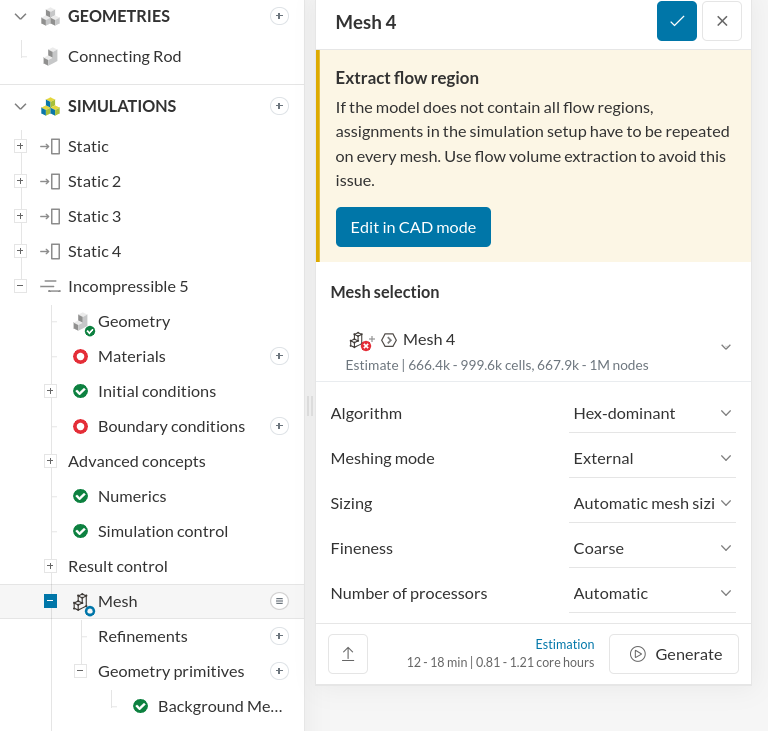
There will be a “Background Mesh Box” automatically added to the Geometry Primitives - this defines your flow domain.
Run the mesh and then assign the BCs etc, as you did before directly on the mesh.
Here is for examlpe a tutorial on the Hex-dominant parametric mesher: Hex-Dominant Parametric Meshing of Front Wing | SimScale
Hope that helps!
Best,
Richard