Hi @hensontauro
I finally completed the assignment, I solved my problems creating a model in Caeses with very soft changes.
What it took me a long process of trial and error.
This is my project with the cases that works good if you want to see it.
Good luck.
Hi Carlos,
Thanks. After tinkering with different combinations of geometries and mesh settings over the last few days, I too finally managed to get a mesh and start simulation runs.
The runs automatically stop at 60-70% every time due to a memory error. I’m trying to fix this, but at least I have some results now.
Cheers 
Hello Anna,
I am unable to see my model when I am putting values of material point. Please have a look at it https://www.simscale.com/workbench?publiclink=7e8ccc92-7af1-4c6a-bf73-fde6daf4444c.
Thank you
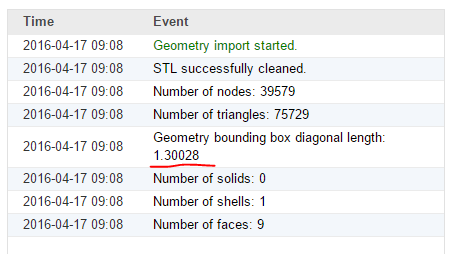
@avagare: If you have a look at the geometry log, you can see that the uploaded geometry is already the correct size (so you don’t need to do a scaling operation).
Hope this helps,
Anna
Thank you so much for your help! 
Hi @anon18194957
When can I expect to get the certificate?
Sorry for the question, but I couldn’t find any information about it.
Regards,
Henson
Hi @hensontauro
We are finalizing the list of eligible certificate recipients and we will send them within a week.
If you have more questions, don’t hesitate to ask.
Best,
Netty
3 Likes
Does that include an access to the professional training course mentioned in the Session 1?
Hi @starless, have you handed in all assignments? I have not found your name on the training attendee list.
Yes, @starless. If you submitted the homeworks, you will be receiving an invitation to a SimScale Professional Training soon.
Best,
Netty
Thank you, I did submit the homework for all three sessions and received confirmation emails. Did I need to sign in to the training attendee list?
Hi @starless, it is not necessary to sign in any list, since you have already received the confirmation E-mail. I hope you will enjoy it! Cheers!
Hi @anon51803486
When will we receive the professional training confirmation email and certificates? I submitted all three homeworks and received the homework submission confirmation mails.
Hi,
I have completed the workshop’s homework assignments and I would like to know when will I be receiving the certificate and also I am very eagerly waiting for the professional training. Please let me know.
Mohd Maseehuddin Siddiqui
@harshit and @msiddiqui you will receive the certificate and additional details about the professional training on Monday 
Thank you @anon18194957 for the info. 
@anon18194957 Thank you madam
Hi again @anon18194957,
I am now having problems with this session. I installed CAESES in my computer (Windows 10 64bit) but when I try to open the project that is given at the beginning of this tutorial, CAESES “Stop working” automatically and closes.
Am I the only person getting this error? I tried to reinstall the software, run in compatibility mode…nothing worked so far.
Any tips about what may be happening with CAESES and Windows 10?
Thank you in advance
Best,
Víctor M.
@vmartinsalve,
Not quite sure the problem on this one - @anon90156724 do you have any ideas?
Still not working. Do have any new ideas?
Thank you