
Hello Everyone,
 As you might have already noticed and as mentioned by Milad in Topic " Step-by-Step Tutorial: Homework of Session 1 - Level 1", the platform was updated yesterday. The updated added a New Feature of “Material Library” to the simulation setup under ‘Model’.
So, all your projects and simulations have automatically been updated to the new setup. Your Drone projects and simulation setups created before 21.10.2015 will now look as shown below.
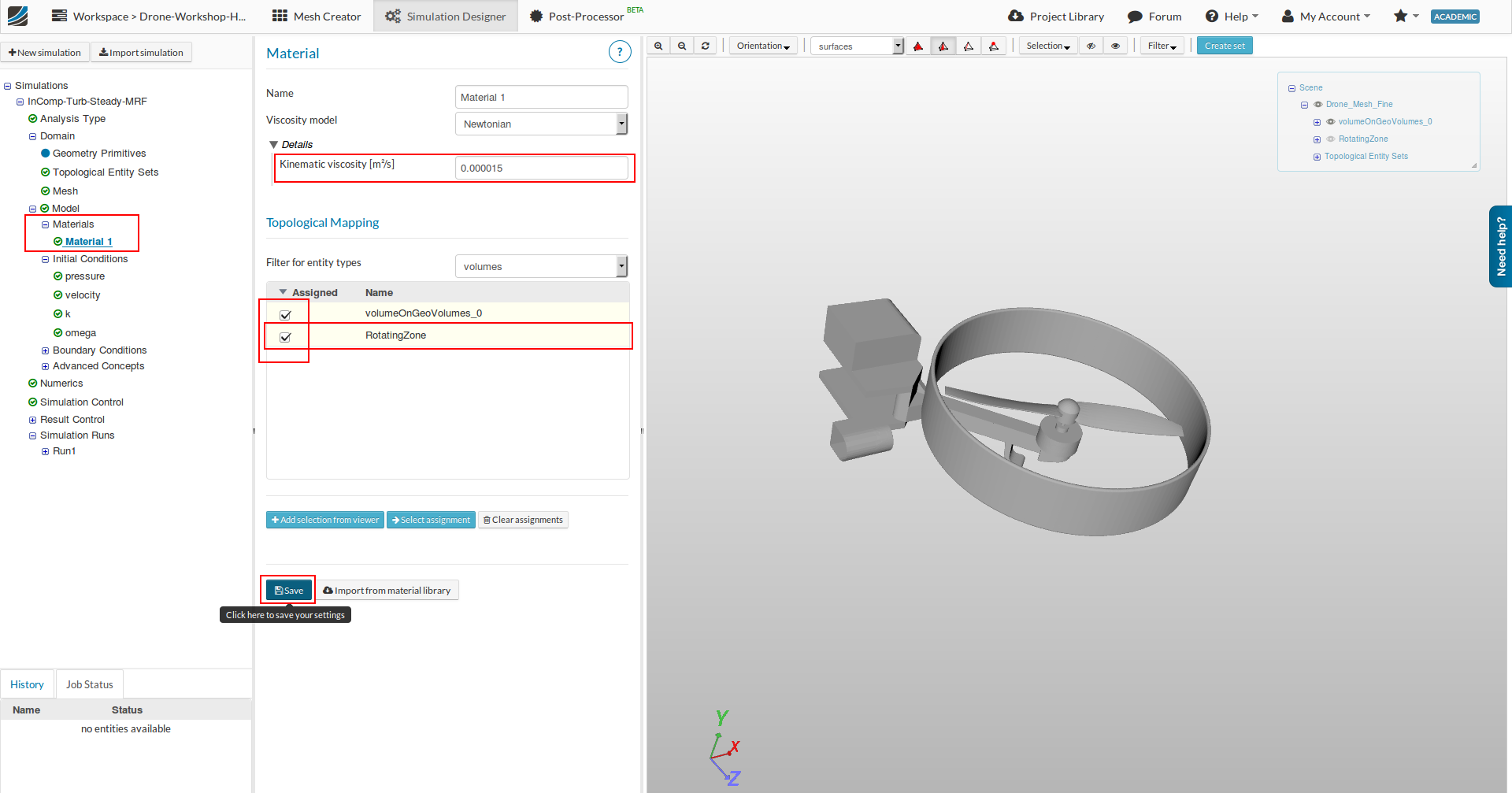
By default, a ‘Material 1’ with properties of Air will be there. Under ‘Topological Mapping’ the 1st entry of ‘volumeOnGeoVolume’ (i.e the main mesh) would be selected by default.
IMPORTANT : Please make sure that you also select ‘RotatingZone’ as shown above ( so that both are selected) and save it for any further Runs. All previous projects and runs will remain valid.
The above TUTORIAL will shortly be updated and show you how to add materials from the library (…its rather easy though  ). Until then, make sure you have made the changes as shown. Ok
Happy Simulating !
Best,
Ali.