I am having trouble lining up my test settings with those given to me on:
found on page 12:
I keep getting warnings that the mesh is unrecommended and that there is no load? any help?
I am having trouble lining up my test settings with those given to me on:
found on page 12:
I keep getting warnings that the mesh is unrecommended and that there is no load? any help?
Hi, and thanks for using the forum!
I had a look at your model, and I agree with the warning on the mesh quality: the thin-walled parts are causing the mesh elements to have a very high aspect ratio (check the meshing log for the statistics). Ideally you want this value to be as close to 1 as possible, with 4 being an acceptable value and 8 a desired maximum for accurate results.
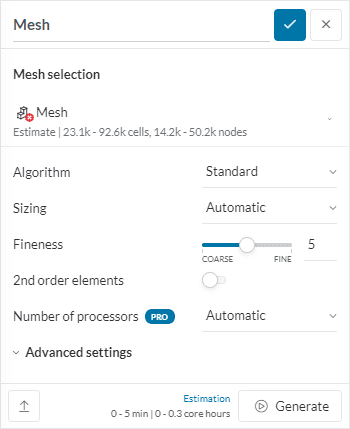
In order to achieve this, please use a manual mesh sizing with a max value of around twice the wall thickness, and a minimum of half the wall thickness. I would also recommend to use a 2nd order mesh.
This will also result in a very big mesh, which you might not be able to resolve with a community account. I suggest you to apply for the academic program:
Finally, in order to save on the model size, I would analyse one star, and reduce the size of the plates to the minimum possible.
Ok, i applied! And i will make those changes.
where can i find the second order mesh button. (i am working on fixing the plate and getting rid of the extra stars)
The wall thickness i have for the core is .004619. Far from zero even at maximum edge length even if multiplied by 2. Should i just put 8 for max and 1 for min?
and what about the local element size refinement? leave that alone?
Hi and sorry if I didn’t make myself clear:
The 8 and 1 are factors of the thickness, thus if your thickness is ~0.004m, I would use:
Using this I would remove the local refinement.