
Hey Jamie,
Some quick answers so you dont have to decipher the super long discussion between dale and myself.
- When you have the layer size feature on (off in the picture) the boundary layer is added in relation to the neighboring mesh size. This means that if you increase cell fineness, your overall BL will become smaller, effecting your Y+ values. Using a 0,3 ratio, your final BL cell will be 30% as thick as this neighboring cell. With layer size off, your BL is in absolute mode, meaning your total BL thickness will stay that size REGARDLESS of changing cell fineness.
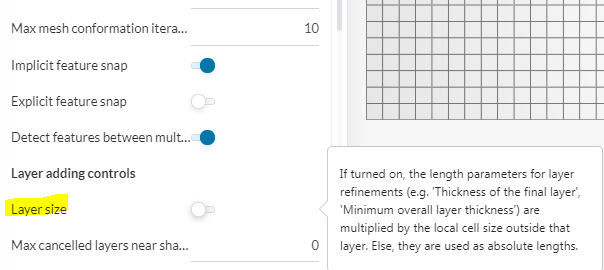
- Most of your questions relate to #1, For this question, the flow detaching or not has nothing to do with your Y+ values. If flow is detaching it is because of your geometry (too aggressive angle of attack etc…)
Your Y+ values are based off of your desired flow measurement ( laminar flow = viscous sub-layer = Y+<8) ( Turbulent flow = log-law region 30<y+<300, with wall functions). For your desired Y+ of 150 and using wall functions, you have done this correctly. Now you just have to achieve this Y+ and verify it. For this i HIGHLY suggest you download the Y+ histogram and ORSI program created by Dale, it is amazing. Here is the link for this information.
Instrucitons for Y+ Histogram and ORSI use
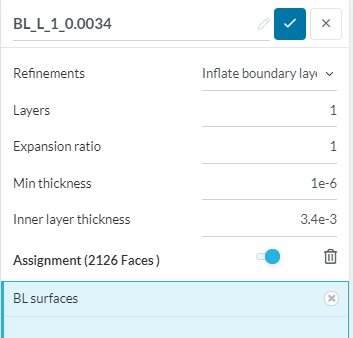
If you want to use the results of that long thread - the single boundary layer method - The settings are:
- Layer sizing OFF
Good luck,
Dan