Hi all,
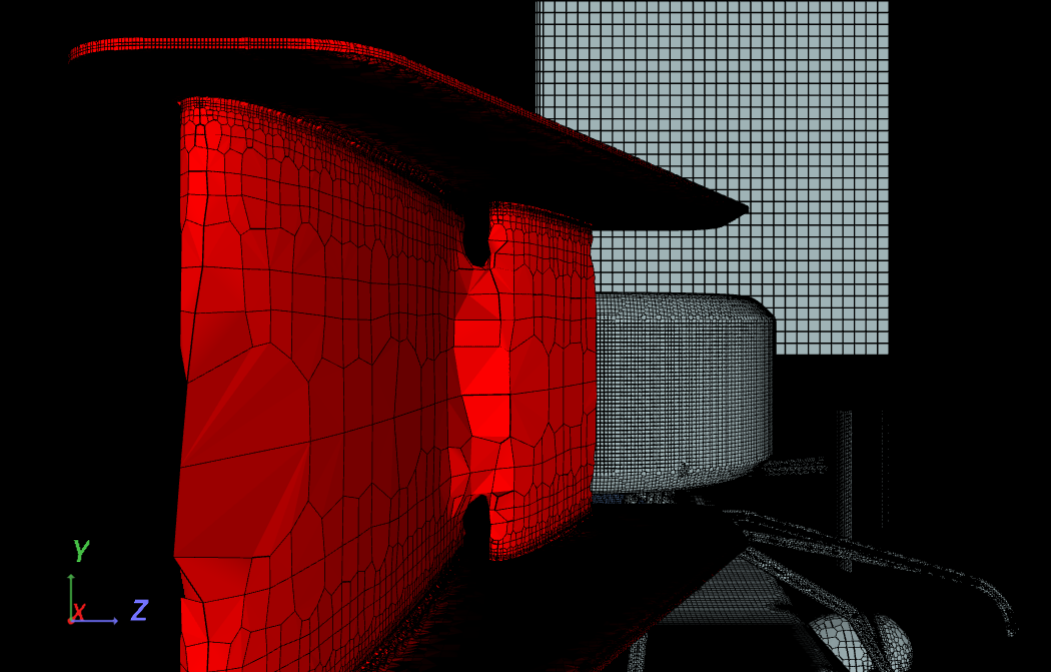
While creating the mesh, I am just facing the same problem as the one @CarlosPrieto mentioned before: the gaps between the flaps of our FW are strangely filled with cells. Besides, the cell density drops dramatically over the surface of the flaps, at least in comparison to all the other parts of the car (and the refinement has been defined as it is in HW2 description).
However, the solution @pfernandez gave to this problem is not applicable to my case, since I have only a single part for all the FW. So my questions are:
- Is there any alternative solution to the names change?
- If the former has no solution, how could I split the FW file into its several parts in order for SimScale to recognize them as separate ones?
- The exact error that I got while the mesh was being created is this one: “Illegal triangles were found after surface tesselation. There could be a problem with the CAD geometry. / The tesselated surface is not closed. There could be a problem with the CAD geometry (such as self-intersections).”. And then the mesh quality check fails. Do I have any chance of succeding if I try to perform the simulation with this kind of mesh?
Thank you very much, any help goes down well.
[Project link]
[Screenshot of the finished mesh]