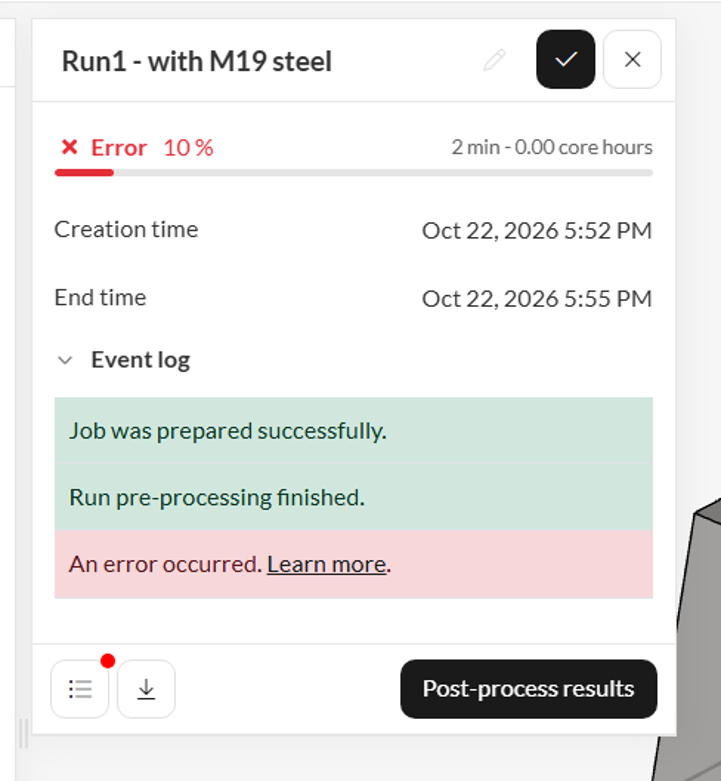
The first simulation ran fine, but I didn’t like the flux density values of 11T in the iron!
I made a copy of the first simulation to make the second entitled “Design intent #2.”. I changed the B-H parameters for the iron from constant (with a Mu relative of 5000) to an input B-H curve. But this time asking it to simulate errored out. I have checked the B-H values, and can’t see anything wrong. I actually used values from Simscale itself but extended the values up to 20T to avoid any need for extrapolation.
Can anybody see what I’ve done wrong? Is 20T simply outside the calcualble range? Shall i just try again?
The core issue is a mathematical formatting error within your custom B-H curve data for the M19 steel. Because the simulation ran successfully when you swapped to a stock SimScale library material, your general physics setup and mesh are fundamentally sound.
When you manually extended the B-H curve to 20T to avoid extrapolation, the solver likely encountered a non-physical slope that caused it to diverge and crash shortly after pre-processing.
You need to check your inputted material data table for these three strict solver requirements:
The Origin: The first data point in your B-H curve must be exactly at (0, 0).
Strict Monotonicity: The values must be strictly increasing. No two rows can have the exact same B or H value, and the curve cannot dip downwards at any point.
Saturation Slope: This is the most common cause of errors when manually extending curves. Once a magnetic material fully saturates, its relative permeability drops to 1, meaning the slope of the B-H curve must match the permeability of free space (mu_0). The slope at your extreme 20T extension must never fall below 4pi*10^-7 H/m. If your manual extension flattened out perfectly horizontally, the solver will fail.
Thank you. I have checked my data, and first data point is 0,0 correctly. I’ve also checked the slope at each point of the B-H curve and it is greater than mu_0 everywhere. All values are distinct and increasing.
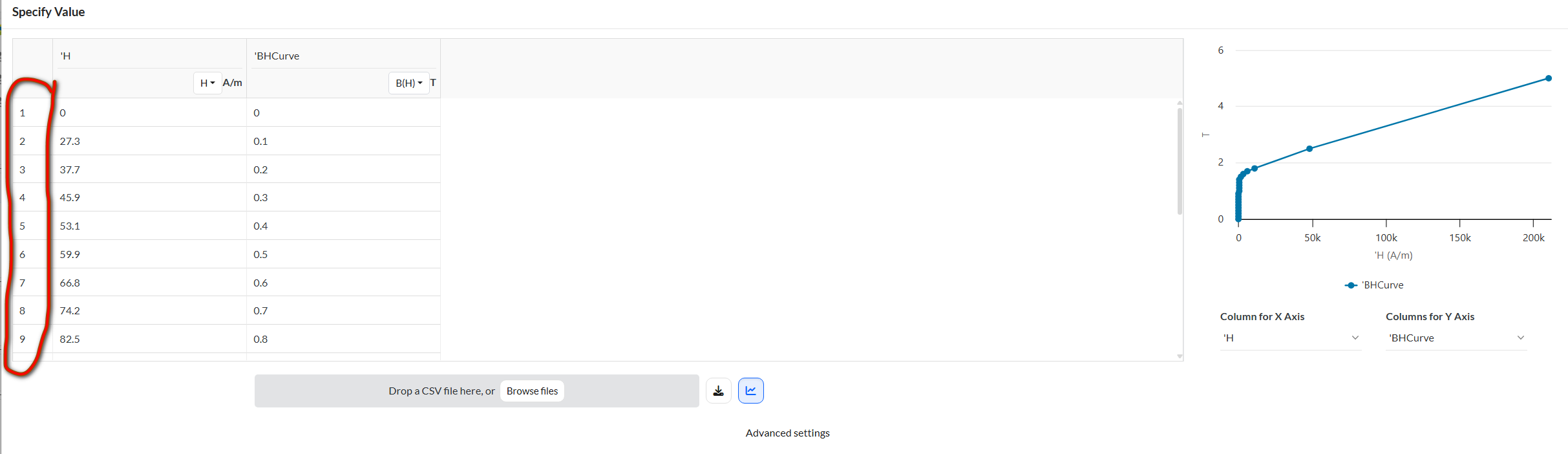
However, looking at the data, there is an extra column of ordinartes. When I loaded the data in, I told it which was H and which was B, and it identified it correctly for the graph, but perhaps that’s not enough for the simulation run?
You have found the exact cause of the error. That extra column of index numbers is what is causing the simulation to crash during pre-processing.
While the SimScale web interface is flexible enough to use your column dropdown selections to plot the B-H curve graph correctly, the underlying electromagnetic solver strictly requires a clean, two-column array (H and B) when parsing the raw file. When the backend solver attempts to read that unmapped third column of row numbers, it corrupts the expected data structure and forces the run to fail.
To resolve this, open your CSV file in a spreadsheet program or a plain text editor, and completely delete that index column. Save the file so that only the raw H and B values remain in a strict two-column format. Once you re-upload this clean CSV and map the axes, your simulation should proceed past the pre-processing stage without any issues.
All the materials in all runs (successful or unsuccessful) have that same column of index numbers. So the material that won’t run looks exactly the same as the materials that will. HOWEVER, I created that material by downloading a material (which adds that column of index numbers, modifying the data and re-uploading it with that index column still present.
That can’t be inspected by me, looking at the data now, but perhaps or your developers can? If this is the case, I think you need to put in a fix. Either show the unwanted column in the UI interface so users can diagnose the issue, or (better) ignore that column on import so it doesn’t happen.
Hi @david_gmail, I am a fellow user without backend access, but you have definitely found a bug, so let’s tag in @BryanArsenio and @RicardoParis to flag this indexing issue for the developers, or you can also report it directly to official SimScale support.
Errors like this, where the simulation fails without displaying a specific error message, are typically caused by a bug. I’ve reported this issue to our SimScale Engineering Team for further investigation.