Hi yapabox589,
Most of this FEA/CFD stuff goes way above my head, but I think I can answer the question raised…
"…could you mark where that FV wall speed = 0 is? "
Forgive me if this is already known and maybe you have solved the issue already, but stepping through this helps me think.
As you know, Boundary conditions (BC) are set up to inform the simulation on how the walls and surfaces are to be treated and this intern influences the resulting flows and the pressures. Quoting Simscale, In Simscale, a wall boundary condition is assigned to a face by primarily defining the behaviour of the flow velocity at that face. In a CFD simulation, a wall can be an internal surface or an external surface.
In general, for the current simulation type there are 3 main applicable options to choose from for setting boundary conditions for your side walls;
- Slip (No side wall friction)
- No-Slip (wall friction)
- Moving wall (can set velocity here, if required)
- Rotating wall (not applicable for this simulation)
Simscale are better at explaining this side wall friction for different conditions, you may have seen this already, I found it helpful, especially the first half of the document.
So going back to your question…
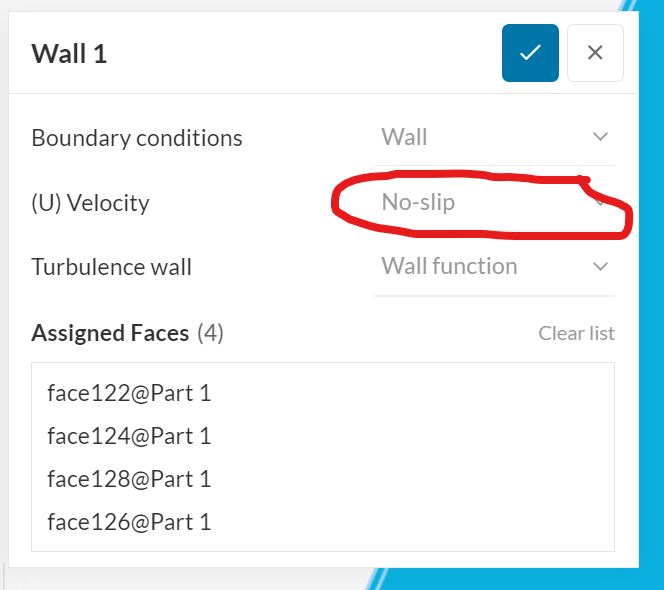
You have an inflow velocity at the inlet of 20m/s and if the 4 side walls were set to No-slip, the side walls therefore have ‘friction’. I think what you are aiming for is to see little to no pressure/velocity change as the ‘2D’ model has straight walls. If you don’t want any influence from the 4 side walls, this can only be achieved by setting the walls Wall1 to either have no friction or have them setup as moving walls.
The current settings show Wall 1 set to No-slip, so set this needs to change to either ‘Slip’ or to a ‘moving wall’ to 20m/s. My guess, both would work for your situation, but don’t take my word, run two simulations to verify.
All the best with your future simulations 