Hi SimScale Community,
I am a student currently working on a Conjugate Heat Transfer (CHT) simulation of an apartment to analyze indoor thermal comfort and the effectiveness of a Mechanical Ventilation (VMC) system.
**The Issue:**
I am encountering a blocking validation error in the Workbench tree that prevents me from starting my simulation or saving a setup. The error message is:
*"This name is not allowed. The name must start with a letter or parenthesis, followed by letters, parentheses, numbers, spaces or -, +, _. Also make sure that the length of the name does not exceed 200 characters."*
I suspect this is related to how I named one of my boundary conditions, materials, or possibly because of the body names transferred during the CAD import from Onshape/Revit.
**What I have checked so far:**
- I tried to avoid using Italian accented letters (like à, è, é, ì, ò, u) in my boundary conditions and materials.
- I checked if any name starts with a number.
- I am looking for other potential illegal characters (like dots "." in U-values, or degree symbols "°" in temperature references, e.g., "30°C") but I am struggling to pinpoint which specific entity is triggering the validation block.
Could you please help me identify which name is causing this conflict in my project tree?
**Project Link (Share with Support is enabled):**
https://www.simscale.com/workbench/?pid=5468379227574173171&mi=spec:0ef64d01-c0e6-46ae-8312-43e85976d241%2Cservice:SIMULATION%2Cstrategy:25&ps=analysis%2FresultControl%2FprobePoints%2F0
Thank you in advance for your help!


Hi,
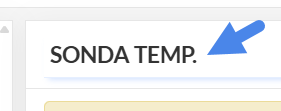
There is a dot “.” in the name of a probe point. So “SONDA TEMP.” is not going to work, but “SONDA TEMP” would work.