Hi everyone,
I’m working on a student project where we want to simulate temperature, humidity, and airflow inside a solar dryer using SimScale, to compare different design setups (e.g. passive ventilation, turbine roof ventilator, thermal flooring).
I modeled the dryer as follows:
-
Rectangular solids representing the walls, roof, and floor, each with a finite thickness to allow conjugate heat transfer
-
A cylinder in the roof representing a turbine (whirlybird) ventilator
-
One large box enclosing the interior, intended to be converted into the fluid region using Internal flow volume
However, when I try to create the internal flow volume, I get the following error:
Invalid Seed face
The Seed face face 2@Box touches at least two different potential flow volumes.
Please select a Seed face that is unique to the desired void region.
I’m struggling to understand how to define a valid seed face here, and I can’t seem to fix the geometry in a way that SimScale accepts. I suspect I may be unintentionally creating multiple connected voids or overlapping volumes, but I’m not sure how to diagnose or resolve this.
I also tried simplifying the model by using one solid box for the entire dryer, but that leads to other setup errors (see screenshot).
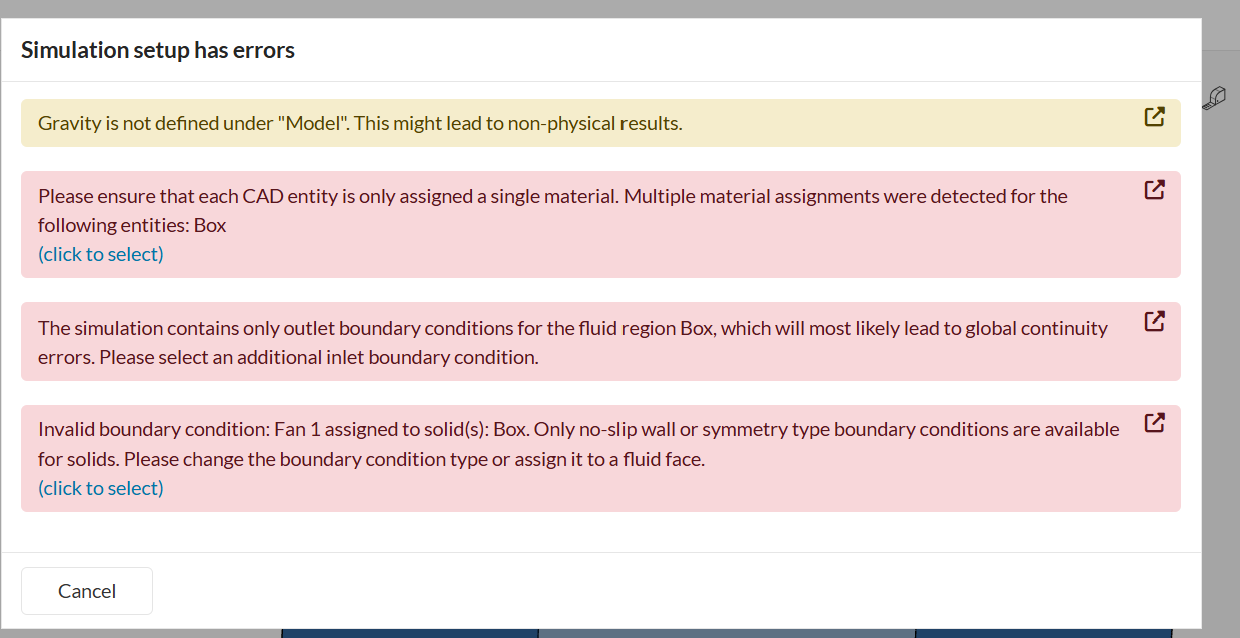
Since this is my first time setting up a CFD + conjugate heat transfer simulation, I’d really appreciate guidance on:
-
How to correctly structure the geometry (fluid vs solids)
-
How to make a valid internal flow volume
-
Whether my modeling approach is reasonable for a solar dryer with natural ventilation
If needed, I’m happy to share any additional information.
Thanks a lot for your help, it would really help us move forward with the project!
Best regards,
Sara