Hello,
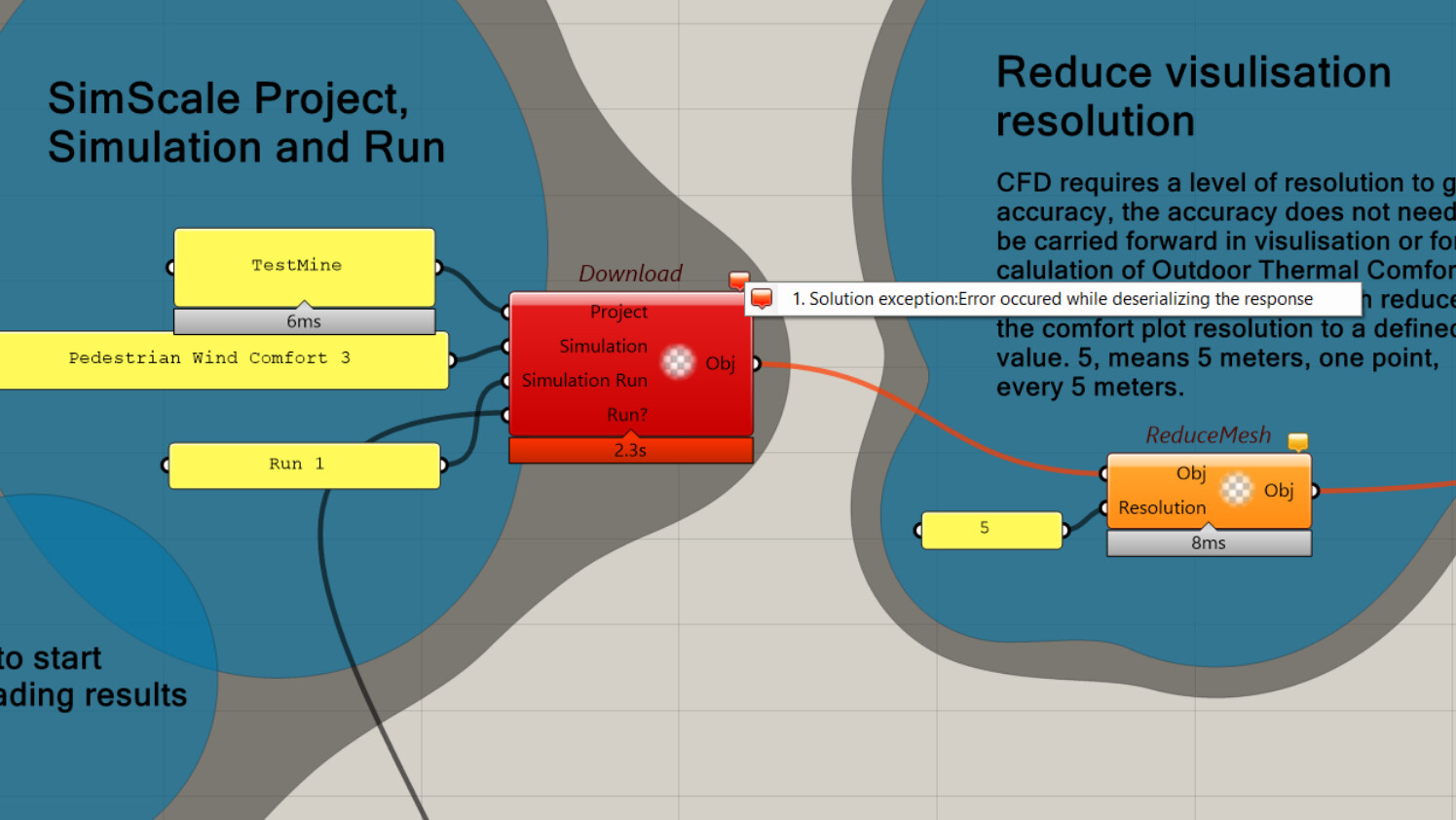
I am trying to download my SimScale building results into Grasshopper using the plugins from here.
# External Building Aerodynamics

**Note:** This is a Windows only plugin
## SimScale-Grasshopper plugin
The use case this plugin is currenty developed for is to visulise SimScale results for wind speed within the Rhino environment using grasshopper. This use case includes also doing additional post processing to the results using Ladybug tools to produce outdoor thermal comfort parameters. We include a some examples of how this can be done, but its by no means an extensive overview of what can be done, and some expertise using Ladybug tools is recomended to perform the outdoor comfort calulations.
SimScale developed this plugin to help our users in the AEC industry to get more out of the results, and we see this plugin as a community contribution, where the coomunity is equally welcomed to maintain and improve it.
## Installation - installer
1. Download the latest `.zip` file from [here](./latest_stable/latest_stable.zip)

2. Unzip the folder latest_stable.zip. Some systems extract .zip folders automatically upon download, so only do this step if necessary.
3. double click the `installer.exe`
4. Download the API key file example `.simscale_api_keys.yaml` from [here](./examples/.simscale_api_keys.yaml)
**Note:** Its really important to ensure the name is `.simscale_api_keys.yaml`, some times the dot "." **prefixed to the begining of the file name** is removed by your system, it needs re-introducing, and signifies a hidden file.
5. Copy the key file to the user's home directory, open it in a text editor, and paste your API key where indicated, from your [SimScale account](https://www.simscale.com/dashboard/api_keys).
**Note:** The home directory can be found by typing the command `echo %userprofile%` into a command terminal, its usually `C:\Users\<CurrentUserName>`
**Note:** For more information on generating API keys in SimScale, see [this guide](https://www.simscale.com/knowledge-base/manage-account/#api-keys).
6. Restart Rhino and Grasshopper. This is requred so that Rhino and grasshopper scan the plugin files upon opening and introduce the plugin under the name SimScale to grasshopper.
7. Install Ladybug tools, usually the best way to do this is running the pollination installer found [here](https://app.pollination.solutions/cad-plugins).
show original
I am using Rhino7 so I do not have to deal with .NET issues. I get this error - I’ve disable my corporate netskope temporarily while running.
Can someone please advise? Is there a test project I can try downloading or way to understand what is causing this issue (my corporate thing or issue with the component itself).
Alternatively, is there a way to download the results manually and providing a path in Grasshopper if the API download is giving me an issue?
Thank you!