
Hi, I’m trying to craete a simulation of a Formula Student prototype and see how adding different aerodynamic elements helps improve perfomance and in which magnitude. For this purpose I plan on simulating the actual car with no aerodynamic elements, and then add them one by one in order to see how each one improves the performance.
I set up a mesh following this tutorial (Tutorial: Incompressible Flow around a Formula Student Car), nonetheless, as I finish it and try to run a simulation the next message appears:
‘‘The quality of the mesh which is assigned to this simulation is below the recommended limits. We recommend to investigate the mesh quality with the suggestions provided in the documentation. We do not recommend to proceed with this mesh as-is because the simulation may diverge quickly, or the results may be unreliable.’’
I’ve tried simplifying the model, but I think it is simplified enough, also I tried adding refinements, but it doesn’t seem to work. Can someone help me, maybe there is something I overlooked.
Thanks in advance, here it is the project link: SimScale
Hi there!
This article should help you to learn how to improve the mesh quality:
I had a look at your mesh, and noticed some regions with bad meshes (high aspect ratio cells):
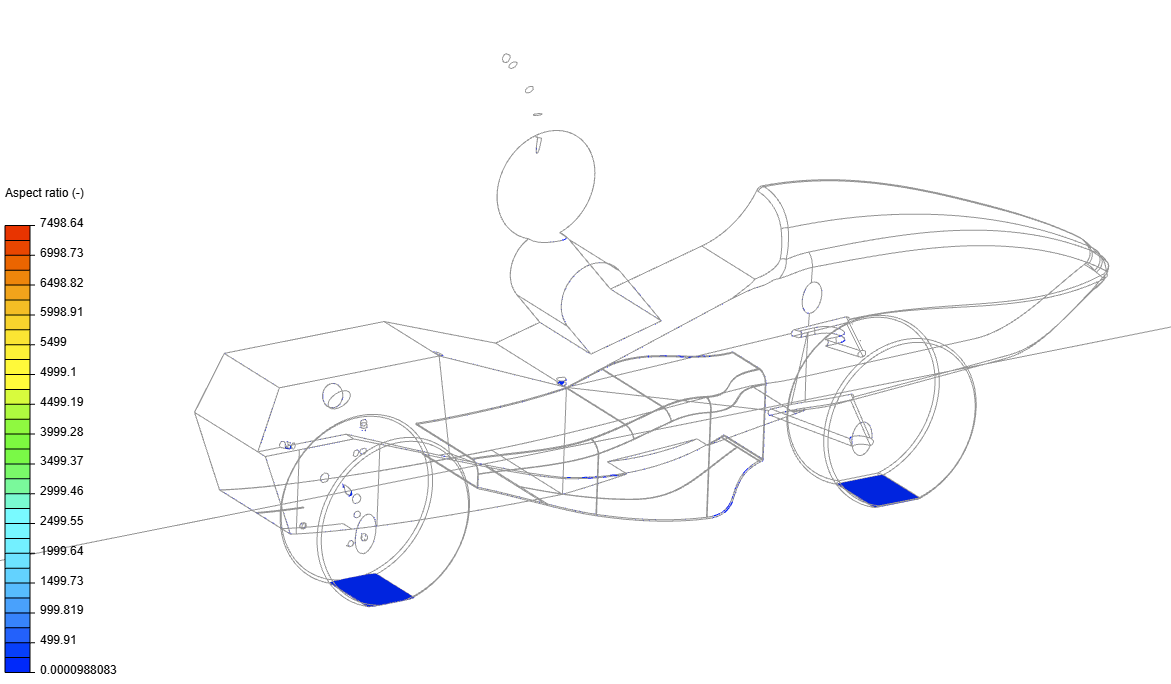
These are the regions where you should simplify and refine. For instance, why are there cells below the wheels? The patch should be cutting the wheels.